Sailing and Windsurfing for All!
The Cal Sailing Club is a volunteer-run community sailing and windsurfing club, located at the Berkeley Marina. We offer lessons, recreation, and programs for the public. Our mission is to make access to water safe, fun and available to all!
Learn more Join now
The Keelboat Log is now online, replacing the paper binder in the dock box and the online Keelboat Status system. So you can easily check the status of the keelboatfleet from anywehre you have a browser and an internet connection. You can also enter issues, upload photos for an issue, record work hours, and record issues fixed online. You can also reserve keelboats subject to Club rules.
Go to Resources->Keelboat Log on the website, and you'll get a dashboard of all boats, with colors indicating status and a list of open issues. You can instantly see the status of all of our keelboats. If you are not logged into the site, you will see all boats with active issues. You will also see active reservations.
To see the issue details, to add or edit issues, to upload photos, or to add work time to an issue, you must be logged into the web site.
To enter an issue, click on the boat in the Dashboard. Then click on New Issue, enter the details, and Submit. To edit an issue, click on the the issue in the Dashboard and then on Edit Issue. Note that you can specify DNS (Do Not Sail) and Fixed, as appropriate. If you specify DNS as yes, and Fixed as no, the boat will appear RED on the dashboard; if you specify DNS as no, and Fixed as no, the boat will appear YELLOW
To add a photo to an issue, click on the issue in the Dashboard and then on Add Photo. You can select a photo an upload it. Only certain types of files are accepted, and the photo will be resized on the server.
To record work on an issue, click on the issue in the Dashboard and then on New Work. Enter what you did, how long you worked on it, and whether you fixed it. It will automatically enter the hours as Volunteer Hours unless you uncheck the box to do so. It will not approve the hours.
To reserve a boat, you must be logged in. Click on the boat in the Dashboard. Then click on Reserve Boat and fill in the information. Note that reservations can only be made for Cruises, earned Private Cruises, and regularly scheduled Club lessons. Reserved boats will have an entry in the dashboard in YELLOW.
All activity will be emailed automatically to the Third Vices.
Just to be clear, this has now replaced the paper binder in the dock box, which you should no longer use.
If you run into any problems, click on Contact Webmaster on any web page and send the details.
CSC Current Volunteer Opportunities
CSC Friend Referral
Get a friend to sign up for a membership at CSC and get 4 hours of volunteer time. Make sure they use your full name in the referral field when they sign up.
General CSC Maintenance
- Pulling Weeds
- Take Out Trash
- Organize/Clean Up Gear
- Tidy Up Clubhouse
- Clean Out Refrigerator
- Refill Gas Cannisters
Windsurfing Lesson Teaching
Admin
Novice Practice Group Organization (Monthly)
Water Start Field Trips (One-Off)
Saturday Morning Dinghy Lessons Coordinator
Equipment and Maintenance
Open House
About this opportunity
Information about open houses can be found on CSC website.
# of Volunteers Needed
As many as possible!
Who
Anybody
What You'll Do
- Kitchen Crew x6+: help in preparing lunches and/or dinner
- PFD Pros x3: help the public find the right safety gear and be safe
- Dock Angels x8: catch boats, cast off boats, help public on and off boats, assist skippers
- Dock Master x2: wrangle guest lines, reinforce rules, assist the public
- Sign-in desk x2: explain and reinforce rules and expectations
- Line Wrangler x2: answer questions and explain what to expect, bonus: teach knot tying for fun
- Keelboat Skippers x6: manage crew and our guests - be ready for lots of kids
- Keelboat Crew x6: Experienced keelboat crew needed to help skippers
- Dinghy Skippers x12: Junior and Senior Skippers needed - let us know if you are a new junior
- Floater x2: Can you do many things? Cool. Help out as instructed by OH coordinator
Estimated Time Commitment
The public event begins at 1:00, but we need volunteers to show up early. That way, we can assess your knowledge and abilities, train as necessary, and place you in the perfect role for the day.
Please arrive by 12:30 and check in with Open House Coordinator or training and placement. The public event ends at 4:00 pm but you should expect to stay until after 5:00 to help put away boats and clean up the yard. There will be dinner after the Open House clean up is over.
How to Volunteer
Keep an eye out for emails for the sign up sheet, check the website for upcomingdates and show up!
Volunteer Lead Coordinator
Vice-commodores
Pulling Weeds
Pulling weeds in windsurfing yard (as needed)
About this opportunity
Weeds like to pop up in the windsurfing yard, primarily under the Novice boards and near the junior boards. Pull them!
# of Volunteers Needed
1-2 as needed
Who
Anybody who can pull weeds
What You'll Do
Pull weeds
Estimated Time Commitment
30m-1h depending on last weeding
How to Volunteer
Look at the weeds and then pull them
Volunteer Lead Coordinator
Nobody
Take out trash
About this opportunity
Check the trash bin inside club house and in the yard (near the refrigerator) and take out to dump which is between CSC and adventure playground. See some trash, pick it up.
# of Volunteers Needed
1 as needed
Who
Anybody
Estimated Time Commitment
20-30 minutes
Volunteer Lead Coordinator
Nobody
Organize/clean up gear
About this opportunity
Somehow wet suits, life jackets, foul weather gear end up on the ground - pick up gear, hang on hanger, if unsure if someone rinsed the gear give it a fresh water rinse and hang up in the appropriate area. There are labels for sizing.
Check the changing rooms
See gear that doesn’t belong to CSC, place in lost and found
# of Volunteers Needed
1-2 as needed
Who
Anybody
Estimated Time Commitment
30m-1h depending on how much gear
Volunteer Lead Coordinator
Nobody
Tidy up club house
About this opportunity
Tidy up like its your kitchen, floor can use swept/cleaned, counters often have leftover food/sticky
# of Volunteers Needed
1 as needed
Who
Anybody
Estimated Time Commitment
1-2 hours depending how messy it is
Volunteer Lead Coordinator
Nobody
Clean out refrigerator
About this opportunity
CSC has two refrigerators, throw away any expired food. Wipe up the refrigerator like its your own. Put away dishes from the sink.
# of Volunteers Needed
1-2 as needed
Who
Anybody
Estimated Time Commitment
1-2 hours
Volunteer Lead Coordinator
Nobody
Refill gas canisters
About this opportunity
Check with Peter or excomm for the location, take the gas cans that we use for the skiff, drive over to a gas station and fill them up. Submit the receipt to treasurer for reimbursement by emailing treasurer@cal-sailing.org
# of Volunteers Needed
1 as needed
Who
Anybody who can get to a gas station safely
Estimated Time Commitment
30m-1h
Volunteer Lead Coordinator
Nobody
Windsurf Lesson Teaching
Novice Windsurfing Class Instruction (One-Offs)
How to Volunteer
About this opportunity
Novice lessons are the lifeblood of CSC Windsurfing, introducing the sport to hundreds of new members every year. You will lead or assist land and water instruction to new windsurfers.
Who
Lead Instructors should be rated J or higher and feel comfortable teaching others to carry and manage gear, uphaul safely, self-rescue, sail steer, and tack. They should feel comfortable with on-the-water instruction (meaning sail near students, and notice and (loudly) communicate helpful feedback).
Assistant Instructors should be rated J or higher and feel comfortable teaching others to carry and manage gear. Ideally, they should also feel comfortable with on-the-water instruction
Launch Assistants should know how to safely carry and launch gear and be able to assist students with sign-out procedures. Novices can contribute in this role.
NOTE: I'd love to see gender parity in our volunteer group!
Estimated Time Commitment
Lead Instructors and Assistants (3.5-4 hours), Launch Assistants (1h, land only)
Volunteer Lead Coordinator
Randi S., Co-Rear Commodore (csc.randi@gmail.com)
Youth Lessons
About this opportunity
Julien and James have been passing the love of windsurfing on to the next generation. They could use assistance with teaching our youngest windsurfers.
# of Volunteers Needed
2-3
Who
J or higher with experience teaching children (maybe as a parent, maybe in some other capacity)
What You'll Do
After shadowing Julien or James, you'll teach whatever group of kids come to the lesson on your own. Regular students, occasional students, and once in a while a new kid.
Estimated Time Commitment
Likely 2h training shadowing, then 2-3h on Saturdays or Sundays 9A, hopefully on a regular basis
How to Volunteer
Email Youth Windsurfing Co-Chairs Julien Traisnel and James Peroulas
Volunteer Lead Coordinator
Julien Traisnel and James Peroulas, Youth Windsurfing Co-Chairs
Sailing Lessons Teaching
Saturday 10am - 1pm
Monday and Thursday (between 1:00 PM and 6:00 PM)
Unable to make these times but like teaching, sign up for lessons on demand
About this opportunity
You must have a Junior Dinghy rating to teach.
# of Volunteers Needed
Pending student demand, but typically as many as possible
Who
Junior Rated members
Estimated Time Commitment
2-4 hours
How to Volunteer
Show up during lessons times or sign up for lessons on demand
Volunteer Lead Coordinator
Saturday mornings there is a coordinator to check in with
Keep an eye out for emails regarding teaching opportunities such as
- Women’s clinics
- Fastrack
- Advanced Dinghy Lessons (advanced junior/seniors)
- Youth program
- Other unique events such as girl scouts, diversity events
Admin
Record teaching outline for Windsurfing Equipment Inspection and Basic Rigging class (one-off)
About this opportunity
Record a teaching outline for the Windsurfing Equipment Inspection and Basic Rigging class. Shadow Sofien when he teaches and write up a teaching outline for the class so other Seniors can teach it.
# of Volunteers Needed
1
Who
Windsurf Junior or higher
What You'll Do
Shadow Sofien, take and organize notes on the key content covered into an outline that other instructors can use, share with Sofien and Randi.
Estimated Time Commitment
~3h
How to Volunteer
Email csc.randi@gmail.com
Volunteer Lead Coordinator
Randi Shapiro, Co-Rear Commodore
Novice Practice Group Organization (Monthly)
About this opportunity
Windsurfing can be a challenge, but it doesn't have to be lonely! Let's get Novices together for regular practice sessions. Low stakes, just some friendly peer "study group" action off and on the water. Maybe twice a month? (Modeled on Neerja’s fab idea from last year.)
# of Volunteers Needed
2-4 (2 spots still open)
Who
Windsurf Novice or fresh Junior with interest in meeting others and practicing on the water
What you'll do
Coordinate w/ other volunteers to assign ownership of each clinic, email this list about the event, check dayleader board to make sure wind is appropriate, and, at the event, facilitate introductions and peer conversation about what attendees know and are struggling with.
Estimated Time Commitment
3-4 hours every month, depending on how you divide the work
How to Volunteer
Email csc.randi@gmail.com
Volunteer Lead Coordinator
You...?
Water Start Field Trips (One-Off)
About this opportunity
Learning water starts is much easier from the beach! BUT many members do not have transportation for club boards. This field trip involves renting a uHaul moving van and coordinating a trip with club gear to either Sherman Island or Alameda.
# of Volunteers Needed
1 per event
Who
Windsurf Junior or higher, must be organized, detail-oriented, and able to handle logistics. You will need a valid driver’s license and proximity to a uHaul OR can find somebody willing to drive a uHaul van. Maybe you’re someone who wants to teach water starts. Maybe you’re someone who wants to learn them!
What You'll Do
Select a target date based on tides and lead instructor availability. Email membership here to solicit registration, making sure we have a Senior and two volunteer instructors. Monitor wind before event to ensure we have enough to make the drive worthwhile. Coordinate gear sign-out and sign-in with Co-Second Vices.
Estimated Time Commitment
1h training, then potentially 3h spread. Plus, obviously, the time spent sailing at Alameda or Sherman Island!
How to Volunteer
Email csc.randi@gmail.com
Volunteer Lead Coordinator
Randi S.
Newsletter articles
About this opportunity
Did you go on a great cruise, or attend a fun event at CSC or just had a great day with a good story - write a few paragraphs and submit to communications@cal-sailing.org for the newsletter
# of Volunteers Needed
1-2 as needed
Who
Anybody who wants to write
Estimated Time Commitment
30m - 2h depending on story
How to Volunteer
Email communications@cal-sailing.org
Saturday morning dinghy lesson coordinator
About this opportunity
Every Saturday, we need 1 coordinator to help wrangle students and assign them to boats with instructors.
# of Volunteers Needed
One per Saturday
Who
Any rating or none; must have shadowed a coordinator before in order to learn the ropes
What You'll Do
You’ll show up around 9:15-9:30 am on Saturday, and you’ll grab the lesson sign-up sheet on the wall behind the desk.
Students will sign up first come-first serve, and you’ll assign them to instructors as the instructors show up.
Students who know how to rig boats should start that upon arrival, so that many boats are rigged when instructors are showing up. Prioritize Touras, Quests, and Ventures as they can hold the most students.
Encourage 1 instructor to lead land school if there are a lot of students sitting around.
Make sure instructors sign out the boats they are on, as they are responsible for it. Students and instructors should be helping to get boats out of the water when lessons are done.
Lessons should be ~20 minutes of tiller time per student - you can radio instructors if they are taking too long and the student list is long.
The goal is to get every student on a boat, which often means in that you may need to close the sign up sheet a little before 12pm.
No leisure sailing is allowed at this time, so members cannot check out boats with their friends or just for fun. They need to be teaching in order to sail.
Once all students are assigned / on boats, you’re good to go! This usually wraps up around 12:30-1pm.
Estimated Time Commitment
~5 hours, but you get double volunteer hours for this one (10 hours per Saturday)
How to Volunteer
Reach out to Owen (sat_am_lessons@cal-sailing.org) to indicate that you are interested. He’ll set you up for a quick training. Once you are trained, you can sign up for slots on this Google doc.
Volunteer Lead Coordinator
Isha Mishra / Birk are right now helping to manage coordinators, but we’d love someone to take the role of Saturday Coordinator Chair (comes with a free membership!)
Equipment and Maintenance
Windsurfing Board Repair
About this opportunity
Boards are fragile; windsurfing is hard. Damage is a fact of life. We need people to pitch in to assist with repairs
# of Volunteers Needed
As many as we can get
Who
J+ or has been signed off on board repair test (if you want to help but don’t have your board repair test completed, attend a repair clinic and get signed off)
What You'll Do
Repair boards. Maybe even ID damaged boards out in the yard. The usual: sand, epoxy, sand, paint, sand, maybe texturize. Wear a mask.
Estimated Time Commitment
~2h per session
How to Volunteer
Email Ted
Volunteer Lead Coordinator
Ted Debonis (TedDebonis@yahoo.com)
Dinghy Sailboat Repairs
About this opportunity
If you broke it - it is not a volunteer opportunity but your responsibility to fix it. Keep an eye out for emails regarding repair clinics, or better yet if you would like to organize a day to repair boats that’d be greatly appreciated!
# of Volunteers Needed
As many as we can get
Who
Anyone can come and learn how to repair, be more helpful next time but you would need to coordinate with some experienced members pending what needs to be fixed - raising mast, fiberglass work etc.
What You'll Do
Repair boats. The usual: sand, epoxy, sand, paint, sand, maybe texturize. Wear a mask.
Estimated Time Commitment
~2h per session
How to Volunteer
Contact firstvice@cal-sailing.org
Volunteer Lead Coordinator
Pending who is coordinating the session
Organize and inventory Sail Locker
About this opportunity
# of Volunteers Needed
As many as we can get
Who
Anyone can come and learn how to repair, be more helpful next time but you would need to coordinate with some experienced members pending what needs to be fixed - raising mast, fiberglass work etc.
What You'll Do
Inventory and organize sail locker
Estimated Time Commitment
~2h per session
How to Volunteer
Contact firstvice@cal-sailing.org
Volunteer Lead Coordinator
Pending who is coordinating the session
Keelboat Repairs
About this opportunity
Our keelboats constantly need TLC. We are lucky that we have a few very committed volunteers who are constantly working on the boats but they need help! Keep an eye out for:
- Winch repair clinic
- Cleaning boat party
- Consider joining the keelboat mailing list
# of Volunteers Needed
Depending on the task, but usually the more the better
Who
Anyone willing to learn and help
Estimated Time Commitment
~2h per session
How to Volunteer
Contact third_vice@cal-sailing.org
Volunteer Lead Coordinator
Pending whoever is coordinating the session
If you see something you’d like to work on at CSC that is not on this list or you have any skills for example being a social worker, therapist, programmer, data jockey - please contact excomm@cal-sailing.org
For example, one person started a monthly newsletter! Another coordinated CSC swag.
Introduction
Keelboat sailing lessons are open to those who have achieved a junior dinghy rating. We believe that this rating gives you the fundamentals of sailing and best prepares you for handling the keelboats, which operate on same principles. Lessons are often given on Wednesday evenings.
The lessons are usually announced by the teachers who will teach that Wednesday night in the Cal-Sailing-Announce email list. Please sign up for that email list to get those announcements.
The lessons are given on the club's six keelboats that are kept on J dock in the Berkeley Marina harbor. The lessons typically last three hours. Students rig the boats, and practice steering, keeping watch, man overboard drill, VHF radio use, compass use, tillerless sailing, changing headsails, spinnaker, and docking. To take a lesson, sign up following the announcement and then come down to J-dock on University Avenue opposite to the Club house, next to the Marina offices, at lesson time.
If you have any questions about keelboat instruction or about becoming a senior skipper, please read the Keelboat Guidelines and contact the Rear Commodore.
Skippers may offer lessons on other days, and will announce on this same list. So watch for announcements.
Keelboat skills levels and progression
The club has divided organized basic keelboat skills into levels that more or less follow a path of increasing difficulty, but not strictly so. The list of skills and levels can be found here:
Cal Sailing Keelboat Basic Instruction Program – Outline of Student Progression
Cal Sailing Keelboat Basic Instruction Program – Outline of Student Progression
Use the list as a set of goals to work on each time you go out for a lesson. As you gain proficiency, your instructor can then sign you off on those levels on your white card, which is where we keep track of your membership info and ratings. Here is an example of what getting signed off on the keelboat levels looks like on your whitecard:
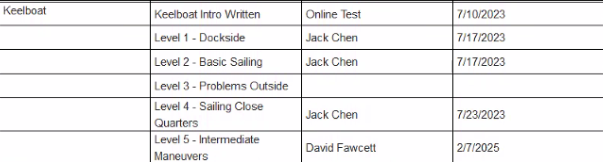
Complete all your levels? Congrats! As you get your levels signed off and you are interested in getting a keelboat skipper rating, you will want to arrange sails with senior keelboat skippers on our Merits and Commanders. You do not need to be a senior dinghy skipper to go for your keelboat rating. See
for more information.
Keelboat Communications
We use Google Groups for announcements and discussions and Slack for discussions. Some are specific to keelboats. To access these communication channels, visit:
Email Lists
Keelboat fleet
To see the types of boats we have, check out: Sailing Fleet
Senior Keelboat sailors must be signed off on the J80 in order to sail it.
There are two levels of signoff:
- White sails, which includes low-wind kite usage. Low meaning 8kn and under (ie, not even close to white capping), so people can get used to hoisting/dousing/handling the kite in calm circumstances.
- Full sign off, sky's the limit.
Who can sign off these levels:
- Anyone with the full signoff can sign people off for white sails
- Anyone with full signoff AND is on the keelboat rating committee can do a full signoff
https://www.cal-sailing.org/who-can-sign-off-tests-and-ratings
What's involved in getting signed off:
This is up to the person signing off, but here is an incomplete list:
- How to hoist/douse/manage the kite even for white sails signoff
- How to furl/unfurl the jib, including don't let the wind take the sail and unfurl it with speed and force. The furler is old and fragile. Also, the jib cannot be used partially furled.
- Jib halyard needs tightened when the jib is first unfurled and loosened before furling for the last time
- How to use the electric outboard
- How to properly put the boat away (here)
- High wind experience. Do you know what to do when the boat won't fall off below a beam? Dropping the main isn't the 1st, 2nd, or 6th answer.
- Discussion of high aspect foils and why that makes it easier to get into trouble in close quarters
Remember, this is a high performance boat. It's not just a slightly more powered and agile Merit (or J/24). It's a completely different beast, and it's also more fragile than our other boats. But it is also waaayyyy more fun.
Advanced Dinghy schedule for 2025 willl be announced in late March.
Mondays at 5pm. Brief whiteboard talk followed by on the water practice.
| May 5 | Small Circles |
| May 19 | Slow Sailing |
| June 9 | Advanced Handling |
| June 16 | Rudderless 1 |
| June 23 | Symmetric Spinnaker |
| June 30 | Roll Tacks/Gybes |
Thanks for your interest in doing work to pay for a club membership!
You can work for 10 hours instead of paying $150 (or $119 if you're astudent or senior) for a three month membership ($99 students and seniors). You have to do the work first, then you join and log the hours on this website, and then, once the hours are approved, you can use the hours to activate your membership by using the website's membership renewal process.
Until your work hours are done and logged and approved and you've successfully "renewed" using those work hours, you won't have an active membership, so you can't sign up for lessons or cruises etc.
First, you have to find some work to do and do it. We don't have a volunteer coordinator, we don't have shifts, it's up to you to find the work and do it. The dayleader can help, but it's up to you.
There are suggestions here You should review all of the website materials to better understand the club's workings. Sign up for the slack channel and announcements lists to learn when there are work parties or special projects or events where your assistance could be useful.
Then, when you've performed 10 hours of work and are sure you can get someone (like the dayleader) to approve them, you sign up for a membership.
Here's how you sign up: On the website, click on Join Now, fill in your information, and click the button at the bottom of the page to sign up.
Then on the next page, scroll down until you get to the text that starts with "Cancel Payment". Click on that text, and you cancel out of payment.
After that, you log into the website and enter your work hours, by going to Enter your Work Hours under Memberships on the top menu.
And after that, you make sure that someone approves your work hours.
Then and only then you log in and go to Renew under Memberships, and you'll be able to activate your membership with the hours you've logged.
Once you've signed up, you have no more than 10 days to sign up, enter your work hours, have them approved, and use them to activate your membership. After 5 days, you'll get a reminder email that you haven't paid for your membership. After 10 days, your signup info gets erased.
Good luck with this! Thanks for offering to volunteer, and see you at the club!
Land Sesson Outline
This land lesson was developed by Steve Burt. His notes follow.
Intro and Goal
The idea of this lesson came about because I found many new sailors having trouble connecting all the dots of what to do with their body. Having a comfortable body position that lets you position (and reposition) your weight and use your muscles effectively to hold the sheet and tiller is a foundation that makes everything else in sailing easier.
Teaching this on the water is difficult (not good to be looking at your feet or hands while driving), and even demoing it is difficult because of distractions. And you can only teach two or three students at once on the water whereas a land lesson can support 5 to 10 per boat. Doing it on land means you can easily demo what you are doing, speak in a conversational voice, and let students get an up-close look from several angles.
The scope of this lesson is intentionally limited -- it is really important that students understand the fundamentals before moving on. You will frequently get students who want to jump ahead or cover other topics; it’s OK to say “I’ll get to that later” or “We won’t be covering that today”. Similarly, as an instructor, you need to resist the urge to add in extra information that distracts from the topic at hand.
I have taught this twice and found that I spend about 45 minutes on body position and about 45 - 60 minutes on tacking, including time for students to try everything. For a bigger group, you could probably use two boats.
Setup:
Pull a Quest out (Toura probably OK too) and drop it on the astroturf, either using the crane or just with 4-6 volunteers. Tie the sail to the boom and raise the boom using the main halyard. Install the rudder (in the up position) and throw some PFDs underneath to cushion it if it falls; you could also tie it up with a strap.
I wouldn’t recommend using a JY since they are overall more fragile and the hull is curved instead of chined. It has also been suggested that we could leave the boat on the cart and put a cooler underneath, but it seems a lot more unstable and I would really hate to see a boat tip over or a person fall out. Just drop it on the ground.
Finally, some Quests have too long of a hiking strap in the back (front strap in back strap position), it usually isn’t a big deal on the water when the boat is a little heeled, but it can cause problems on the land, avoid those or fix the strap.
Syllabus:
Part I: Hiking out, body position, tiller & main sheet
(Talk) Why body position is important: comfort, control, visibility, ergonomics.
(Talk) Role of skipper in dinghy: usually tiller and main, need to be able to handle both.
(Talk) Basic body positions for medium+ winds: sitting on gunwhale and hiking out.
(Talk) lighter winds, docking -- sit lower, even stand. Or make crew sit low.
(Demo) Transitioning from standing/kneeling in the center of the boat, to gunwhale, to hiked out, to hiked out hard and back in again.
(Demo) Comfortable hiking position -- toes in strap, butt over side, body vertical. Key thing to show is just how far you can get out and how this position should be fairly sedate.
Bad hiking positions (butt on gunwhale with body flat, body twisted)
Looking forward, sheeting without looking at hands or tiller.
Stop here and let students try it out.
(Demo) Holding the tiller: frying pan versus microphone vs everything else.
(Demo) Sheeting with microphone grip. Failing to sheet with frying pan.
(Demo) Sheeting entire length of main sheet quickly
(Demo) Holding both in one hand in case you need to do something with the other hand.
(Talk) Things not to do -- wrap sheet around wrist. Hold sheet in mouth. Wrap sheet around tiller. Rely on mainsheet cleat.
(Demo) Hand over hand sheeting to sheet quickly. Sheeting quickly with big arm movements.
(Talk) Use of mainsheet to control heel -- should become instinctive as you gain proficiency.
Stop here and let students try it out. Look for students using frying pan -- show them that they can’t sheet quickly.
Part II: Tacking
Note: I recommend practicing a few tacks yourself before the class. Go very slowly and break down what you do so you can talk through it. My general cues are 1) head up, looking in intended direction (90 degree windward and then forward) 2) ease mainsheet slightly and come in out of the hiking strap 3) tiller out of microphone and begin turn 4) back foot across 5) eyes still looking forward, waiting for sail to come across 6) both hands on tiller 7) shift weight to back foot as sail comes over 8) release “old” tiller hand and 9) sit down on new side, ready to straighten tiller 10) grab sheet and switch to microphone grip. 11) sheet main and straighten tiller to new course. The exact order of this will vary depending on how hard they turn, where the weight needs to be to keep the boat flat, etc. Generally the key things to keep in mind are head up and looking in direction of travel, back foot first, and both hands on tiller to make the switch, everything else will flow out of that.
(Talk) Tacking -- course (90-120 degree turn through eye of wind)
(Talk) Where to look (where the boat will go), keeping your eyes out of the boat
(Talk) Looking upwind (over shoulder) before tack to clear area; danger areas (upwind boat on same tack, crossing boats, swimmers, sailboards etc)
(Talk) Priorities in tack -- make it through turn before losing speed. Less important -- keeping sail sheeted in.
(Talk) Dangers -- Cleated main. Backwinded jib. Look if you crew is having trouble and abort
(Demo) Switching to frying pan and sliding in, starting turn, stepping in once sail start to flog.
Call attention to back foot; show what happens if you go front foot first (end up facing backwards)
(Demo) Centering weight, grabbing tiller behind back, looking forward, watching boom come around. Steering in this position. Aborting.
(Demo) Finishing the tack; swapping tiller hands; sitting down, returning to microphone
Stop and let students cycle through.
Wrap up; answer questions, etc
Cal Sailing Club
Day Leader
Written Test
Directions
Select the appropriate answer for each question. Closed Book – 30 questions (30 questions will be selected randomly from the questions below for the test). You must answer at least 23 questions correctly to pass.
Test Conditions
There is a time limit of 45 minutes to complete the test. This is intended to be a Closed Book Test. You are on yor honor not to consult any other sources or people while you are taking the test.
Results
After you complete and submit the test, you will see whether you passed. If you passed, you can and should review your incorrect answers. Many answers have a detailed explanation for the correct answer. If you did not pass, you will not be able to review your answers. You may retake the test whenever you like. There is no limit to the number of test attempts.
- Which of the following tasks is NOT part of the requirements for opening the club?
- check equipment signout sheets
- drop the motorboat in the water
- unlock back gate
- put on PFD with knife and fully charged and powered-on VHF radio
- sign into timesheet on arrival
- True or false – if there are still members inside the clubhouse or yard when you are closing the club, you have to kick them out unless one has a Senior key, takes responsibility for locking all the gates and doors, and you record their name in the online logbook.
- True
- False
- The word “Roger” in a radio call means
- the letter “R”
- pirate
- understood
- When calling a person or a boat on the VHF radio, the first thing to say is
- “Cal Sailing Club, Cal Sailing Club, Cal Sailing Club”
- the channel you are calling on
- the name of the boat or person you are calling, repeated three times
- Mayday, Pan Pan, or Securitay, repeated three times
- The channels to use on the VHF radio are
- Channel 16 only for emergencies, Channel 69 for all other purposes
- Channel 16 for calling Coast Guard, Channel 68 for other purposes
- Channel 16 for hailing boats and calling the coast guard only, 69 for all other purposes including calling Cal Adventures, and 68 for calling the City Harbormaster
- When on shift, you must wear
- your Cal Sailing Club t-shirt
- wet suit booties
- foulie jacket
- PFD with knife and radio
- New members who want to pay dues by cash or check
- get a written receipt
- have to take it to our bank and deposit it
- can give the cash or check directly to the treasurer
- can do so at the Harbormaster’s office
- Members must record damage
- to dinghies in the online dinghy log, to windsurf gear by contacting the second vices through our website
- to dinghies or windsurf gear by writing a note in the logbook kept in the desk
- to dinghies by hanging a DNS (do not sail) sign on the boat, to windsurf gear by tagging it with blue tape and writing on the tape the date and type of damage
- True or false – if a member comes with a guest and wants to sail a dinghy on a lesson day, they can do so provided no students are waiting for a lesson, and they agree to return to the dock and give a lesson to any students who arrive for a lesson without other instructors available
- True
- False
- Members can find suggestions for volunteer work
- updated daily on the bulletin board in the clubhouse
- by contacting the volunteer coordinator
- on the website, by clicking on Join Now, then clicking on link for work suggestions
- on the website, by clicking on Resources, then clicking on Work Suggestions
- Entering work hours
- should be done by the 15th of the month
- should be done by the 1st of the following month
- should be done at the end of your shift
- should be done when you arrive and as you leave
- Which of the following is NOT required for a club member to use the motorboat:
- California Boater Card
- Senior rating
- authorization from the dayleader who is on duty
- use is for club sponsored activities such as setting buoys for sailboat races
- If a member is windsurfing in the Junior area wearing a long sleeved wetsuit and harness and the sign out sheet shows the board they checked out is labeled J95-3.
- they should be wearing a PFD unless their white card on the website shows that they have passed the foiling test
- they should be suspended for sailing outside the novice area
- their white card on the website must show that they have a Jr or higher windsurf rating
- it’s OK as long as they wrote Jr on the sign out sheet
- You should let members sail dinghies out of sight of the clubhouse
- if they’re just going down to the cove by the Seabreeze market
- if there’s a Senior on board
- if they’re sailing a Venture
- if they have signed out the boat and their white card on the website shows Senior or higher rating
- If you’re ever in doubt about the rules you are supposed to enforce, the best thing to do is
- send an email to the Port Captain
- ask a member at the club, especially one with a Senior or higher rating
- look on the website under Rules
- look on the website under Resources
- If you can’t make it to the club for your assigned shift,
- just email the Port Captain
- you have to try to find another dayleader to cover for you
- you don’t have to try to find another dayleader to cover for you, but you do have to contact the Port Captain on the morning of your shift.
- you need to find a Senior member to post a club closed sign for you
- From least urgent to most urgent, order the distress calls you may hear on channel 16:
- MAYDAY, SECURITE, PAN-PAN
- SECURITE, PAN-PAN, MAYDAY
- PAN-PAN, SECURITE, MAYDAY
- If a member is breaking a club rule (for example, sailing outside the area for their rating) and harasses you when you try to stop them, one thing you should definitely do is:
- suspend them for two weeks
- refer them to the Conduct Chair
- get their member ID and full name from the website
- contact the Commodore
- The wind speed meter is
- located above the clubhouse
- calibrated in knots per hour
- displayed inside the clubhouse and on the website
- displayed only on the web
- You should expect members to have the greatest difficulty sailing and windsurfing
- in southerly wind
- when the waves are highest
- when the wind is not only strong but also violently gusty
- anytime the wind is over 12 mph
- Which of the following is not a good rule for limiting members based on windspeed
- Seniors only in winds over 20 knots
- Junior Skippers must reef their sails in winds over 15 knots
- Novice windsurfers and sailors may not sail in winds over 10 knots
- J+ windsurfers may be restricted in winds over 20 knots
- You should carefully scan the water, using binoculars to check the areas near the rocks
- at least 4 times in a typical afternoon shift
- at least every 5 minutes, even in calm wind, and continuously in gusty wind over 20 knots when you’re not out on the motorboat
- every hour when the wind is under 5 mph
- even when there are no members on the water
- PFD’s must be worn by everyone using club boats, windsurfers, kayaks, or SUPs EXCEPT
- when in the cockpit of a club keelboat
- when wearing a wetsuit
- Novice windsurfers don’t need to wear a PFD
- J+ windsurfer wearing harness and long sleeve long leg wetsuit
- Which of the following is an Indication that a member is likely to have great difficulty on the water?
- carrying windsurf sail above their head
- placing a dinghy sailboat on its dolly under the hoist
- windsurfer wearing both PFD and harness with long sleeve long leg wetsuit and booties and helmet
- sailboat leaving dock and heading north, windsurfer launching on upwind side of dock
- You should allow members to use kayaks and paddleboards
- if they have the rating for kayaks or paddleboards
- if they show their Red Cross card
- only in the Novice Area
- in the Junior Area if the wind is less than 15 knots and you feel it’s not so windy that you need to restrict them to the Novice Area
- The distress signal that members will make to signal you for a rescue is
- holding both hands above their head
- raising and lowering their sails
- swinging both arms above their heads
- Before towing a sailboat,
- attach the tow line to the stern of the boat
- have the skipper remove the drainplug
- check in with the harbormaster
- have the skipper raise the centerboard 2/3 of the way up
- When rescuing a windsurfer
- always have them sit on their board
- attach the tow line to the universal of a Novice board
- always keep the motor running in case it won’t restart
- loop the tow line around the universal of Junior, J+, or Senior boards, or have the member lay on the board holding the tow line
- The club website has
- dinghy lesson signups under Resources
- Port Captain’s contact info under Our Team
- club telephone number under Contacts
- club hours based on tide predictions on front page button top right
- At times during the year, you will need to
- provide drinking water for club members to avoid heat stroke
- advise members to check windsurf gear for frost damage
- check weather forecast such as wunderground for fog prediction
- scan the hills for low clouds
- If your assigned shift includes closing the club, and you have to leave early but can’t get a replacement dayleader
- email the Port Captain
- you must close the club
- a volunteer dayleader can take over, provided they are signed off for both office and motorboat rescues, and provide you record it in the daily logbook
- If someone has hypothermia with symptoms include shivering, slow shallow breathing, and nodding off to sleep, you should NOT
- call the Coast Guard
- give them anything to drink
- give them CPR even if you are trained to do so
- put them in a hot shower
- Emergency and non-emergency call numbers for Coast Guard, police, fire
- are posted on the club website
- are posted on the console of the motorboat
- are listed in the dayleader manual
- Emergency response pickup locations for motorboat rescue
- are in the Berkeley marina harbor
- are in the cove by the Seabreeze
- are at the dock in the Emeryville harbor or the west dock by Cal Sailing Club, whichever is quickest to reach
- A harassment report
- is required only when you can positively identify an interaction as sexual harassment
- will be kept completely confidential except for you and the police
- should be submitted in writing to the Conduct Chair, with names redacted
- should be made first to the Port Captain, unless they aren’t available or you feel uncomfortable, then the Commodore
- When driving the rescue skiff, always wear
- spray suit
- kill switch lanyard
- whistle
- hat
- During a rescue, never
- go out alone
- back up with tow rope laying slack in water
- shut off motor
- anchor near beach
- At slow speed, the motorboat can make a tight turn if you
- increase speed, then turn the steering wheel
- turn the steering wheel all the way to one side, then apply a burst of full throttle
- never
- applying full throttle briefly, then turn wheel hard
- If someone is on the rocks
- Have them climb rocks and carry gear back to club
- Raise motor and drift to where they can swim to you
- Find spot 200 ft directly upwind, then drop anchor
- Drive by rocks trailing tow rope
- At 15 knots wind speed
- Waves can flip the motorboat
- Rescues should not be done alone
- Juniors should not be allowed to windsurf
- Whitecaps just start to appear on water when it gets this windy
- Fuel for the motorboat
- Is kept in the locker by the porta-potties
- Should be mixed with two-stroke oil
- Should be purchased from the diesel fuel pump in the marina
- Before launching, always make sure the motorboat has
- Dock bumpers on both sides of motorboat
- Extension tow rope
- Boarding ladder
- Spare fuel tank
- If the water depth is 1.5 feet
- always use the Venture with the air cooled motor
- keep motorboat planning by always operating at full speed
- No sailing or windsurfing
- Raise motor to keep prop out of mud, and go very slowly--don't gun the engine
- If the water depth is less than a foot
- Row
- Use a paddleboard for rescues
- Avoid driving backwards
- Raise motor halfway up
- In a rescue, the tow rope should be tied
- to the nose of beginning windsurf boards
- to the boom of large windsurf sails
- with a bamboozler knot
- to the stern of dinghy sailboat
- A good way to dock the motorboat is
- Stop boat a few feet upwind of docking place
- Back into dock just like parallel parking a car
- Use reverse to slow down from planing speed
- Approach dock from downwind, shut off motor when 10 feet from dock
- If the motor shuts off while driving
- start rowing, even if the windspeed is more than 10 knots
- check the gas tank level, turn the motor on/off switch off and back on, jiggle the gearshift and pump the primer bulb
- radio for a tow
- switch to reserve
- NOT needed to start engine:
- Oil recirculation line in place
- Flush attachment on engine and hose turned on full, or boat in water and motor lowered
- Evinrude XD100 oil in tank inside engine cowling
- Gearshift in neutral
- Lanyard attached to switch on engine
- After checking oil, make sure
- Fuel pump is switched on
- Oil recirculation line is attached
- Blower is on high
- Engine cover is on securely
- Which is NOT crucial for safety?
- keep passengers seated while driving
- lanyard attached to you when you are driving
- Shut off engine when someone is in water within 6 feet of propeller
- keep hands and all other body parts inside boat when there is risk of hitting dock, other boats, pilings, or other heavy objects
- No windsurfing during low tide
- When hoisting the motorboat, you should always:
- Make sure the sling is NOT hooked around the gearshift lever
- Plug the two holes in the transom by the engine
- Position the trailer so the bow line is below the hook on the hoist
- Tie the bow painter to the trailer with a bowline knot

Cal Sailing Club members enjoy numerous opportunities to race club dinghies. The competition is friendly but not lax. Racing at CSC is an excellent way for new sailors to learn some of the finer points of sailing and for experienced sailors to hone their skills.
What's it like?
This is casual racing, with competitors themselves running the regatta. There is (usually) no committee boat to call starts/finishes, or make visual signals.
Competitors race one-design in the club's dinghies. We usually race JY15s, which are best sailed by two people. Other days we'll switch it up and race Quests, Ventures, Lasers, or all of the above in a mixed fleet. Boat handling and tactics reign supreme, and sometimes luck.
We usually set short courses around temporary buoys, sized for races lasting 10 to 15 minutes intended to provide more mark roundings, tactical decisions, and close encounters than would occur over a longer course. Typically there are 6 to 8 races in two hours of racing, so skippers and crew have experienced a physical and mental workout by the time it's over.
Drawings of our most common courses can be found here:
When are races?
Racing is held year round, but more frequently in the summer months. Start times and any race-specific information will usually be posted to the calendar and always sent to the announcements mailing list at least a day in advance.
Racing is rain or shine, but maybe postponed or canceled due to stormy weather.
In all cases, plan to arrive at least an hour before the scheduled start time to find a partner, rig a boat, and attend the pre-race briefing.
Sunday
Racing is held nearly every Sunday of the year. The start time is traditionally 11:00 am, but can vary depending on tide and weather forecast. In the shoulder seasons we may switch to afternoons to chase the waning sea breeze.
Thursday
Thursday night racing is held from April through October starting at about 5:00pm, followed most nights by dinner.
Tuesday
Occasionally in the summertime there will be an evening "round the pier" race. Each boat must be skippered by a senior skipper, since the race leaves the bounds of the Junior Area. This race usually features boats with spinnakers to take advantage of the long downwind leg. Given the requirement for a senior skipper, these races require advanced signup.
Who can race?
All club members and their guests are welcome to race. Each boat racing must be skippered by a current member with at least a dinghy Junior rating who has passed the racing rules test online or received an exception from the race committee.
Up and coming sailors, new members with a racing background, and more - anyone looking to have fun with sailing, hone their skills, and connect with their fellow club members in a friendly environment is encouraged to attend. It’s best to have at least a handful of outings on a dinghy under your belt, so consider a [Saturday lesson] first if you’re new to sailing.
The skipper doesn’t need to helm, and it’s common to switch positions several times throughout the day.
Contacts for your questions
For further information about dinghy racing please contact the dinghy race chairs at Sundays or Thursdays.. The #racing slack channel is a fairly active forum for discussion of all upcoming racing and racing-adjacent events as well as tactics and techniques.
Sailing Instructions
We’ll use these instructions for races unless otherwise stated.
Rules: 2021-2024 racing rules of sailing.
Entry: No pre-registration needed. Every boat racing must have a responsible person (skipper) aboard who has 1. a dinghy Junior rating 2. passed the CSC racing rules test. Any member or guest may crew.
Signals: No visual signals will be made. Starting signal will be 3-minute audible signals sounded by an electronic starting horn buoy (Ollie*). In case of equipment failure, a whistle may be used. The signals are described in detail here: Start Sequences Used at CSC
Please pass on any hails made by the race committee.
Course: The course will be announced during the skippers’ meeting. Most common courses are listed on this document. The course may be changed between races. Any changes will be audibly hailed. The start/finish line is open; you may sail through it when not starting/finishing.
No starting penalties unless otherwise specified during the skippers’ meeting. If you start too soon, return to the pre-start side either through the line (“dip the line”) or around the end.
Rule 44.1 is modified. All fouls require a one-turn penalty only. Foul someone? Take a single penalty turn with a tack and a gybe. Touch a mark? Single turn (same as the official rules). Do both at the same time? Single turn.
Scoring? Not usually. Sitting on a committee boat is no fun. Live in the moment of your victory until the next race starts.
Protests? The finer points of any rules questions arising from a day’s races are discussed informally back at the dock or over slack.
Racing Rules Test (aka Racing Skipper Written Test)
Like most sailboat racing, CSC dinghy races are conducted under the International Sailing Federation's Racing Rules of Sailing, or RRS. The current version of the RRS is 2021-2024.
All skippers racing must pass our written racing skipper test online or receive approval of the racing committee (eg. new members with previous racing experience may be granted a temporary waiver). The CSC Racing Skipper test is based strictly on the RRS circa 2010, and is open book. A pdf copy of the test is available here. You can take the test online here (you have to be logged in).
There have been updates to the RRS since CSC's handbook was published in 2010, so be sure to review the latest rules.
Study resources for the rules:
- The Rules in Practice by Bryan Willis.
- The Racing Rules of Sailing 2025-2028
- Racing Rules Youtube playlist
- The online racing game by Uli and Wolfi Finckh.
- https://www.racingrulesofsailing.org/forums
For further information about dinghy racing and the Racing Skipper test, please contact the dinghy race chairs for Sundays and/or for Thursdays.
Collisions while Racing
If you are involved in a collision while racing, please fill out this post-collision report form.
Members can request dinghy tests via the self-evaluation system on the website (for Novice and Junior ratings only at this time). Instructors can also recommend their students for these tests, and this helps testers decide how to allocate their testing slots for requested tests.
Note that you must have a Dinghy Junior rating in order to recommend students for tests.
What the student has to do in order for you to recommend them
The student has to have requested a test via the self-evaluation system.You should encourage your students to use this system so they can see in detail what the test will involve. You might want to check it out yourself here so you can see what your students will need to do (you have to be logged in to use the link). Click on a test to see the self-evaluation form for that test. The data is private until the member answers the question "Are you ready for the test" as Yes, which triggers a request to be posted on the testers' bulletin board and the self-evaluation form to be visible to testers.
How you recommend a student
You look up their digital White Card. Login to the site and go to Membership->White Card or use this link. You can lookup the student using their member ID or by searching on a part of their name or email. For example, to lookup a member we use for testing the website, John Bongiovanni Test, you might enter bong in the search area

Enter or click Search to see a list of matches (if there is only one match, it will take you directly to the matched member's White Card).

Click on the Name to go to that member's White Card. Scroll down to the beginning of the Tests section, and you should see a link to click on to recommend the member for a test.
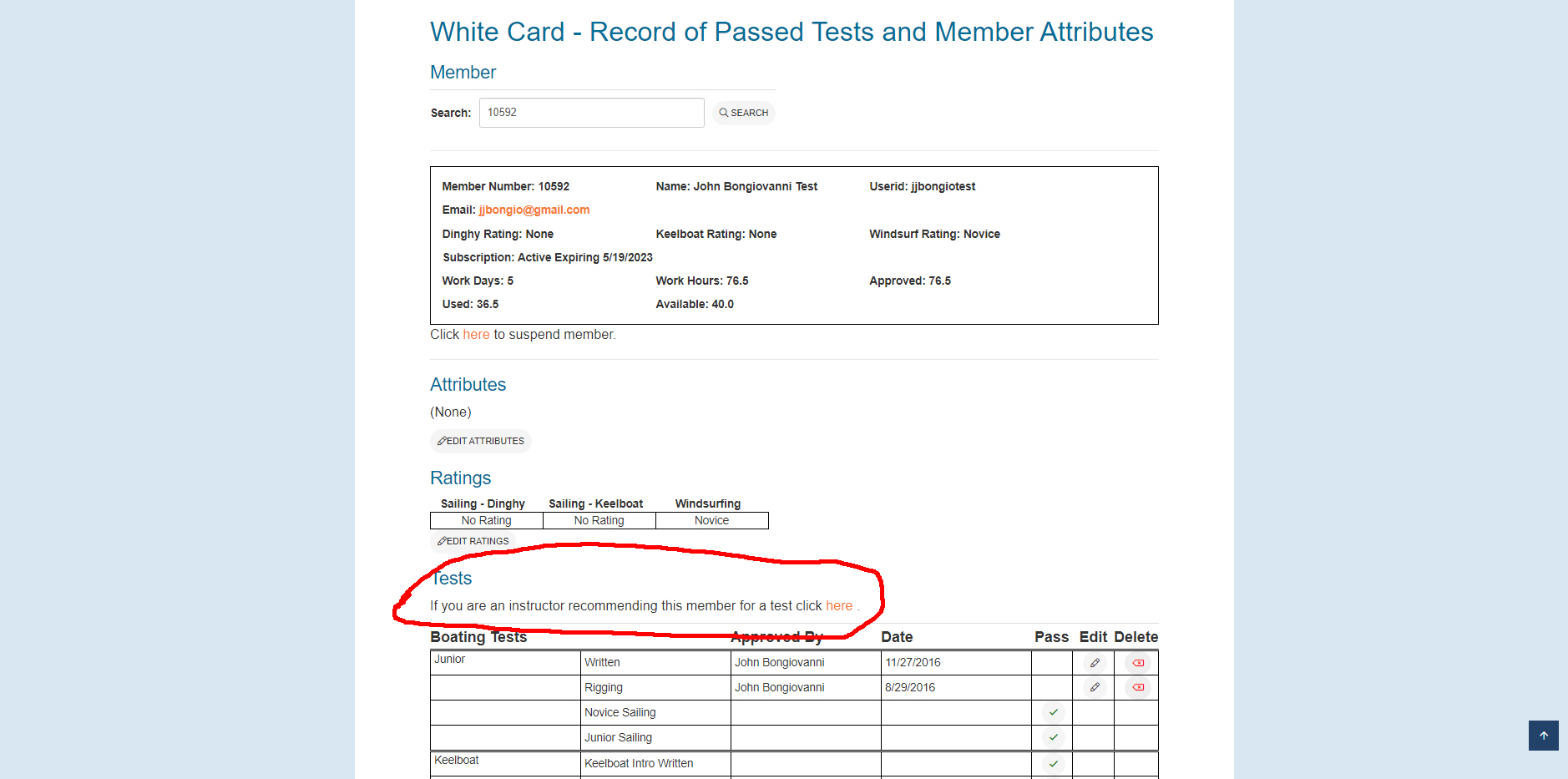
If you do not see this link, it's either because the member has not requested a test or you do not have access to recommend them (i.e, you're not a Dinghy Junior).
Click on the link, and you'll see this.

You can enter comments if you like, but they're optional. Click on Submit Recommendation and you're done.
You can only recommend a student once for a test. If you try to do it again, you'll get an error message to that effect.
We're talking about Rigging, Novice, and Junior tests.
This is a self-evaluation system for the dinghy tests: rigging, Novice, and Junior. For each test, it shows you what's covered and allows you to rate yourself and track your progress. You go here (you have to be logged in to use this link). Then you select the test, and you'll see a list of items covered with the opportunity to rate yourself on each (either Y/N or 1 through 5, depending on the item). There is also a question asking you whether you're ready for the test. If you answer yes, a request is posted on the Testers' Bulletin Board. A tester will then contact you for the test.
For the Junior test, you can and should get a recommendation from an instructor who has sailed with you. When testers look at your request, they will see this recommendation. This will help the testers get a better sense of who is ready for the test, and it will help you get a test quicker.
Use the self-evaluation to see when you're ready and make sure to get instruction and feedback on the more difficult Junior maneuvers (docking, COB, and small circles). When you think you're ready, ask your instructor for feedback and a recommendation.
Note that Novice tests are harder to get during the Summer, as testers are consumed giving Junior tests and members should be focused on the Junior rating. At other times of the year, winds are lower and Junior tests may not be possible very often, so we emphasize the Novice rating more then.
Note for Dinghy Instructors
Your feedback is really important to your students, all the time, and you are in the best position to evaluate their skills relative to the rating requirements. Your input is also useful to testers deciding whether to honor a test request.
Please encourage your students to use the self-evaluation system, give them honest feedback, and when you think they're ready, post a recommendation. It's pretty simple, and documented here.
We will be offering Advanced Dinghy lessons every Monday beginning May 9, except for Fast Track weeks and weeks with holidays.
These are workshops on advanced dinghy skills, including skills you'll need to pass a Senior Dinghy practical test. Topics include sail trim, live crew overboard, surviving and getting back in 30 knots, rudderless sailing, and more. The sessions are open to Junior skippers only. Announcements will go out a few days ahead of time with the topic and instructor. There is no need to sign up, just show up and get a boat ready. There will be 2 students per boat. If you are not comfortable sailing with someone else in a dinghy, you should not attend.
The sessions will run from about 5pm to dock time, a half hour before sunset. The quicker we can get boats in the water, the sooner we can start. Sessions will start with a land talk and a demo near the dock. The land talk and demo are open to all members, but only Junior skippers can participate in the on-the-water part. This is the schedule:
May 9 Intro, and small circles with John
May 16 Single-handed docking with Elyakim
June 6 Sail trim with Elaykim
June 20 Rudderless sailing with Andy
June 27 Live crew overboard with Camille
July 11 Slow Sailing with Mariya
July 25 Surviving 30kts with Mike
August 1 Jib-only with Birk
August 8 Rudderless sailing with Ryan
August 22 Blindfolded sailing with Andy
August 29 TBD
John Bongiovanni will kick off the series on May 9 with a discussion of the Senior Rating – what it means, requirements, and the different paths available. This will be followed by a workshop on small circles, an important skill that is essential for maneuvering in tight quarters.
No sign-up necessary. Show up at 5pm or earlier, pair up, get boats in the water and be ready to sail.
Who Can Sign-Off on CSC Tests and Ratings
This is where/whom to go to get tested and signed off.
Dinghy Sailboat (up to Junior)
- Written Test - Can be taken online by logging into the website and clicking here. If you do not pass, you will not be told what you got wrong, and you have to wait a day to take it again. You must be a logged-in member to take the test.
- Rigging Test - Given by Senior Sailor.
- Sailing Test (Novice or Junior) - Given by Senior Sailor.
- The system updates the rating when all requirements have been met.
Click here to get a list of Senior Sailors. You must be a logged-in member to view this information.
Windsurf Ratings (up to Junior+)
- Written Test (Novice) - Can be taken online by logging into the website and clicking here. You must be a logged-in member to take the test.
- Sail Handling and Self-Rescue (Novice) - The Day Leader can give these tests.
- Written Test (Junior or Junior+) - Can be taken online by logging into the website and clicking here. for Junior or here for Junior+. If you do not pass, you will not be told what you got wrong, and you have to wait a day to take it again.
- Rigging Test (Junior or Junior+) - Given by Senior Windsurfer.
- Sailing Test (Junior or Junior+) - Given by Senior Windsurfer
- The system updates the rating when all requirements have been met.
Click here to get a list of Senior Windsurfers. You must be a logged-in member to view this information.
Advanced Ratings (Senior and Cruise)
Refer to the Club Operating Rules or talk with a Senior Sailor or Windsurfer.
Day Leader Training, including Skiff Operation
Signed off by Port Captain.
High Performance Dinghies
This refers to Laser, RS500, RS800, and UFO and also to the use of the symmetric spinnaker on dinghies by Juniors.
To sail any of these boats, you must be instructed in rigging and sailing the boat. You must be a Junior to sail the Laser or the UFO. Additionally, you must be a solid Laser sailor to sail the UFO. You must be a Senior to sail the RS500 or the RS800.
For the Laser and the RS500, you must be signed off by a member who is qualified to sail the boat. For the RS800 and the UFO, you must be signed off by a member who is qualified to sign off on them.
A Senior may use the symmetric spinnaker on a dinghy, but a Junior must be signed off by a member qualified to sign them off
You can get a list of members qualified to sign off for the Laser, the RS500, the RS800, the UFO, or the Dinghy Symmetric Spinnaker by clicking on it. You must be a logged-in member to view this information.
J-80 Keelboat
To sail the J-80, you must be a Keelboat Senior and be instructed in rigging and sailing it. There is a separate sign-off for basic sailing (main and jib, and gennaker in up to 8 kts wind) and for unrestricted sailing with the gennaker. Sign-off must be done by a qualified member.
The requirements for signoff are here.
You can get a list of members qualified to sign off for the J-80 Basic or for the J-80 Gennaker by clicking on it. You must be a logged-in member to view this information.
In these menus you can locate and sign up to reserve SUPs and kayaks. In the upcoming reservation tab you can locate future signups (you must be logged in to see this). If you click on one, you can find out more details. If there is space, an option to register will be active in which case you can sign up to reserve equipment. Otherwise, an option to join the waiting list will be active so that if a registered participant cancels you will be notified and given the option to register for a reservation.
In the my signups tab you can locate reservations you have made and cancel your reservations for upcoming events (you must be logged in to see this). Please cancel your reservation if you can no longer make it to your reserved day so that other members are given the opportunity to participate.
Kayaks and SUPs (Stand Up Paddle Boards) are available to be used in the junior area by all CSC members at dayleaders' discretion. Anyone signing up to use the kayaks or SUPs must pass the re-opening COVID training to sign up.
Our kayaks are tandem, sit-on-top plastic kayaks that weigh about 80 lbs and are not well suited for one person to carry to the dock and paddle alone. It is strongly suggested that they be checked out by users who have another household member to go out with them. Like dinghies and keelboats, only household members can go onboard kayaks with club members at this time.
All regular gear check-out and sanitation protocols also apply to kayaks and SUPs at this time. You must check in with the dayleader on arrival, observe all covid precautions, wash down the kayak or SUP and spray the paddle handle areas after use, and check out with the dayleader. Kayaks and SUPs can only be used once each day, in order to dry out thoroughly between uses.
WAIVER AND RELEASE OF LIABILITY
For and in consideration of the CAL SAILING CLUB (“CSC”) allowing me, the undersigned, to participate in any capacity in a CSC sanctioned, licensed, or approved event or activity (“Activity”) I, for myself, and on behalf of my spouse, children, heirs and next of kin, and any legal and personal representatives, executors, administrators, successors, and assigns, hereby agree to and make the following contractual representations pursuant to this Agreement (the “Agreement”):
I certify that I am physically fit, have sufficiently prepared or trained for participation in this activity, and have not been advised to not participate by a qualified medical professional. I certify that there are no health-related reasons or problems which preclude my participation in this activity.
- RULES AND REGULATIONS: I hereby agree to abide by the rules, regulations, and policies of the CSC, including any and all COVID-19 related safety measures required by the CSC, the City of Berkeley, the State of California, the federal government, or any other governmental body or agency with jurisdiction over the activity.
- ACKNOWLEDGMENT OF RISK: I knowingly, willingly, and voluntarily acknowledge the inherent risks associated with the sport of sailing, and that participation in any CSC involves risks and dangers including, without limitation, the potential for serious bodily injury (including broken bones, head or neck injuries), sickness and disease (including communicable diseases such as COVID-19), trauma, pain & suffering, permanent disability, paralysis and death; loss of or damage to personal property; exposure to extreme conditions and circumstances; accidents involving other participants, event staff, volunteers or spectators; contact or collision with other participants or natural or manmade objects; adverse weather conditions; facilities issues and premises conditions; failure of equipment and/or protective equipment; inadequate safety measures; participants of varying skill levels; situations beyond the immediate control of the Activity organizers and competition management; and other undefined, not readily foreseeable and presently unknown risks and dangers (“Risks”).
- ASSUMPTION OF RISK: I understand that the aforementioned Risks may be caused in whole or in part or result directly or indirectly from the negligence of my own actions or inactions, the actions or inactions of others participating in the Activities, or the negligent acts or omissions of the Released Parties defined below, and I hereby voluntarily and knowingly assume all such Risks and responsibility for any damages, liabilities, losses, or expenses that I incur as a result of my participation in any Activities. I also agree to be responsible for any injury or damage caused by me or any agents under my direction and control at any Activity.
- RELEASE AND INDEMNITY: In consideration of my participation in any Activity, I hereby release from liability and waive any claims against CSC, the City of Berkeley, the owner or organizer of the Activity, its licensees, managers, promoters, sponsors, advertisers, beneficiaries, venue providers, and supporting organizations, together with the officers, directors, employees, volunteers and contractors of them (the “Released Parties” or “Activity Organizers”), with respect to any liability, claim(s), demand(s), cause(s) of action, damage(s), loss, or expense (including court costs and reasonable attorney fees) of any kind or nature (“Liability”) which may arise out of, result from, or relate in any way to my participation in the Activities, including claims for Liability caused in whole or in part by the negligent acts or omissions of the Released Parties. Further, I agree to indemnify, defend, and hold harmless the Released Parties and Activity Organizers against and from any and all Liability imposed on, incurred by, or asserted against any Released Party or Activity Organizer resulting from, arising out of, in connection with, or relating to my breach of this Agreement.
- RIGHT TO USE IMAGE: I also hereby give permission to use, reprint, and reproduce any photographs or video taken of me and my child/ward and any written material supplied by me or my child/ward in the form of evaluations, during any Cal Sailing Club activity.
- COMPLETE AGREEMENT AND SEVERABILITY CLAUSE: This Agreement represents the complete understanding between the parties regarding these issues and no oral representations, statements or inducements have been made apart from this Agreement. If any provision of this Agreement is held to be unlawful, void, or for any reason unenforceable, then that provision shall be deemed severable from this Agreement and shall not affect the validity and enforceability of any remaining provisions.
- ACCEPTANCE OF AGREEMENT BY ELECTRONIC MEANS: I agree to conduct this transaction by electronic means and acknowledge that agreeing to this form by electronic means or electronically submitting a membership application to CSC indicates my intent to be legally bound by the Agreement. (See Cal. Civil Code section 1633.5(b).)
I HAVE CAREFULLY READ THIS DOCUMENT IN ITS ENTIRETY, UNDERSTAND ALL OF ITS TERMS AND CONDITIONS, AND KNOW IT CONTAINS AN ASSUMPTION OF RISK, RELEASE, WAIVER FROM LIABILITY, AND INDEMNIFICATION.
These are windsurfing instruction videos (produced by former windsurfing rear commodore Will Spargur) that have been contributed over the years at CSC.
Novice Windsurfing: On the Water Tips
Review carrying your rig to the dock and launching. Watch video.
Review body, sail and board position on the water. Watch video
More on body, board positioning in relation to wind direction. Watch video.
Review self-rescue, steering, tacking, falling, return to dock. Watch video.
Checking out Equipment
Getting started: checking out gear, getting set up properly and checking for damage. Watch video
Tacking Footwork
Turning your board: Exercises for practicing tacking on land. Watch video.
Foiling
Get your ratings, and you can do this new kind of windsurfing! Watch video.

You can lookup, sign up for, or cancel your participation for upcoming keelboat lessons. Instructors can create keelboat lessons and manage signups.
Students:
All signup activity is managed in this link (you must be logged in to use this link).
You will see all upcoming lessons, with a description and a list of prerequisites. If you meet the prerequisites (rating and tests passed, you will be able to signup. When you click the Signup button, you might have to certify that you have met additional requirements (by checking a box). You can also enter additional information, such as a telephone number. Click Submit, and you will be on the signup list. You can also edit your signup info (telephone number) or cancel your signup. If you cancel it, you can also reinstate it here. You can also view the signup list.
Getting a lesson slot is based on a lottery. When lessons are oversubscribed, students will get the slot based on a random lottery number they get when they sign up. The lesson description includes the date and time the lottery runs (usually, but not always, the night before). You will get an email notifying you whether you got a slot or are on the Wait List. If you are on the Wait List, you'll get an email notification if someone cancels and a slot opens.
Instructors:
All of your activity is managed in this link. This will show you a list of lessons including any that you have set up. You can also select to display all lessons instead of only lessons in the future (the default). You can add a less either by clicking on New Lesson and filling in the fields, or by cloning an existing lesson. When you clone, it will pick up all of the descriptive information, including prerequisites, but leave dates and times blank. You will get a page to enter this information, and you can edit the information copied.
When you enter a lesson (or clone one) you can define prerequisites. A prerequisite can be a rating, a test pass, or something else that you define. The default rating is Dinghy Junior, but you can change that. You can set a test pass required. For example, if you want to teach only at Keelboat Level 3, you can specify a prerequisite of passing Keelboat Level 2. The system will not allow signups who do not meet the rating and test pass prerequisites. You can also add an aribitrary requirment, such as "Must have a whistle and strobe light". Signups will have to certify that they satisfy this in order to sign up.
You can view the signup list for your lesson and send email to any of the participants. You can also see an abbreviated White Card for any of the signups.
You can send a lesson announcement (and edit it, if you like). The announcement will be posted without having to be moderated. You can also delete your lesson.
These are sailing instruction videos that have been contributed over the years at CSC plus some from other sources.
Rigging and Sailing a JY-15
How to rig and sail this fun boat, emphasizing the differences between this and the RS Quest we use for basic instruction. By CSC member Riley Shear. Watch video
Rigging and Sailing a Toura and a Venture
How to rig and sail these fun boats, emphasizing the differences between them and the RS Quest we use for basic instruction. By CSC member Riley Shear. Watch video
How to come about
Basic tacking in a Laser Bahia, applicable to all of our current boats. by CSC member Damian Lucas. Watch video
RYA video on tacking emphasizing use of the tiller. Watch video
How to sail backwards
Basic techniques for sailing backwards in a keelboat capable of it (not a Commander), by Antonio LaFuente camera work by Joel Brand) Watch video.
How to rig a Quest
How to inspect, rig, and reef a Quest at Cal Sailing, including using the hoist to put it into the water. By Jack Chen with help from John Bongiovanni. Watch video.
Capsize Recovery
A series of videos by Camille Antinori with help from Joanna Karraker.
1. At the dock. Get crew ready to prevent a capsize and to deal with it safely if it happens. Watch video.
2. The recovery. How to do it on any dinghy. Watch video.
3. Dry recovery on a Venture. How to deal with the characteristics of this large dinghy and get yourself into the cockpit as the boat comes up. Watch video.
A basic description of capsize recovery for new sailors by Min Lee and John Bongiovanni. Watch video.
Anchoring on a Dinghy
You'll need to do this for your Novice and Junior practical tests (and maybe in real life also). By Min Lee and John Bongiovanni. Watch video.
How to reef a dinghy mainsail
How to do it properly to get better boat control and not damage the sail. By Saul Schumsky and Jack Chen. Watch video.
How to rig and fly the gennaker
On a Laser Bahia, but applies to the Quest, Venture, and other boats. By CSC member Andy Kuo. Watch video.
Flying the gennaker on the RS500
By Nathan Ilten, A CSC member who moved to Vancouver and is active in the University Sailing Club there (this is their instructional video). Watch video.
Rudderless sailing
An essential Senior skill that will give you better boat control at all levels of sailing. By Rama Hoetzlein and Andy Hacket, with video drone assistance from Will Spargur. Watch video.
How to Coil a Keelboat Dock Line
When the boats are tied up, the free ends of the dock lines tend to get left strewn over the docks, which can be a trip hazard. It is also not good for the lines if people are stepping on them or if they are hanging in the water and turning green. This video shows a quick and simple way to stow the free end around the horn cleat. It also makes it easier for the next crew taking out the boat. Watch video.
These are sailing instruction videos that have been contributed over the years at CSC plus some from other sources.
Rigging and Sailing a JY-15
How to rig and sail this fun boat, emphasizing the differences between this and the RS Quest we use for basic instruction. By CSC member Riley Shear. Watch video
Rigging and Sailing a Toura and a Venture
How to rig and sail these fun boats, emphasizing the differences between them and the RS Quest we use for basic instruction. By CSC member Riley Shear. Watch video
How to come about (tack)
Basic tacking in a Laser Bahia, applicable to all of our current boats. by CSC member Damian Lucas. Watch video
RYA video on tacking emphasizing use of the tiller. Watch video
How to sail backwards
Basic techniques for sailing backwards in a keelboat capable of it (not a Commander), by Antonio LaFuente camera work by Joel Brand) Watch video.
How to rig a Quest
How to inspect, rig, and reef a Quest at Cal Sailing, including using the hoist to put it into the water. By Jack Chen with help from John Bongiovanni. Watch video.
Capsize Recovery
A series of videos by Camille Antinori with help from Joanna Karraker.
1. At the dock. Get crew ready to prevent a capsize and to deal with it safely if it happens. Watch video.
2. The recovery. How to do it on any dinghy. Watch video.
3. Dry recovery on a Venture. How to deal with the characteristics of this large dinghy and get yourself into the cockpit as the boat comes up. Watch video.
A basic description of capsize recovery for new sailors by Min Lee and John Bongiovanni. Watch video.
Anchoring on a Dinghy
You'll need to do this for your Novice and Junior practical tests (and maybe in real life also). By Min Lee and John Bongiovanni. Watch video.
How to reef a dinghy mainsail
How to do it properly to get better boat control and not damage the sail. By Saul Schumsky and Jack Chen. Watch video.
How to rig and fly the gennaker
On a Laser Bahia, but applies to the Quest, Venture, and other boats. By CSC member Andy Kuo. Watch video.
Flying the gennaker on the RS500
By Nathan Ilten, A CSC member who moved to Vancouver and is active in the University Sailing Club there (this is their instructional video). Watch video.
Rudderless sailing
An essential Senior skill that will give you better boat control at all levels of sailing. By Rama Hoetzlein and Andy Hacket, with video drone assistance from Will Spargur. Watch video.
The videos below are keelboat-specific. We also suggest you check out the instructional videos for dinghies as many fundamental skills you learn on a dinghy are transferable to the keelboats. In fact, that is why at CSC, we have you become at least a junior dinghy sailor before getting your keelboat rating.
How to Coil a Keelboat Dock Line
When the boats are tied up, the free ends of the dock lines tend to get left strewn over the docks, which can be a trip hazard. It is also not good for the lines if people are stepping on them or if they are hanging in the water and turning green. This video shows a quick and simple way to stow the free end around the horn cleat. It also makes it easier for the next crew taking out the boat. Watch video.
Departure and Docking under Sail
Departure and docking under sail are quintessential skills taught at CSC. In fact, in 2024 the city recognized our historical berths on J-dock as a key location where we can practice these skills in all conditions and wind directions. The skill transfers to other sailing scenarios where engines may fail and refined maneuverability under sail is necessary. Watch Video
Cruise from Berkeley to Alameda - J80
Contact Webmaster is temporarily unavailable.
Keelboat Status is now online so you can check whether boats are reserved, DNS, or out of service for maintenance on the website.
Go to Resources->Keelboat Status on the website, and you'll get a dashboard of all boats, with colors indicating status and a list of notifications.
There are three categories of notifications:
- Advice - general information, things to watch out for
- Reserved - boat reservations for cclub Cruises (official or earned private)
- DNS - Do Not Sail
The dashboard is color-coded based on these notificaitons. Note that reservations are only for Club Cruises (official or earned private). This is not a way to reserve a boat for any other purpose. We will continue to follow the first-come-first-served at the dock policy for all other uses.
Anyone can see the dashboard. Any logged-in member can see the dashboard and the notification details. Any Senior or Cruiser can add, edit, and delete notifications.
Just to be clear, the online sysem is running in parallel with a manual system, which is signs on the boats (for DNS, reservations, etc.). Please remember to update both, as some members don't have online access or just don't check.
If you run into any problems, click on Contact Webmaster on any web page and send the details.
CSC Foiling Written Test
Directions:
Select the appropriate answer for each question. Closed Book - 27 questions - you must answer at least 22 questions correctly to pass.
The wind direction is from the top of the page to the bottom. Diagrams are drawn from a top-down bird's-eye perspective.
Test Conditions:
There is a time limit of 60 minutes to complete the test This is intended to be a Closed Book Test. You are on your honor not to consult any other sources or people while you are taking the test.
Results
After you complete and submit the test, you will see whether you passed. If you passed, you can and should review your incorrect answers. Many answers have a detailed explanation for the correct answser. If you did not pass, you will not be able to review your answers, and you must wait for 24 hours to retake the test.
If you pass, this will be noted in your digital white card automatically.
Questions
- What is the first thing you must check before taking out the Foil?
- Tide In/out & Water depth
- Wind speed
- Dock Time
- Sign out sheet
- What aspects of the foil should you check before use?
- See if any of the foil mounting screws are loose (main wing, back wing, mast)
- Check to see if there are any cracks in the carbon fiber wings.
- Check to see if there are any cracks in the board.
- Check to see if the foot straps are loose.
- All of the above.
- When slogging how deep does the foil reach below the waterline?
- No more than 2 ft
- About 3 ft but could be more depending on rider weight
- Exactly 3ft under all conditions
- 4 ft or more
- If the tide is rising, what is the minimum water level that you can take out the equipment?
- 0 ft
- 1 ft
- 2 ft
- 3 ft
- 4 ft
- 5 ft
- If the tide is falling, what is the minimum water level that you can take out the equipment?
- 1 ft
- 2 ft
- 3 ft
- 4 ft
- 5 ft
- 6 ft
- What is a good rule of thumb for how fast the tide drops at Berkeley Marina?
- 0.25 ft/hr
- 0.5 ft/hr
- 1.0 ft/hr
- 1.5 ft/hr
- With the tide falling and water depth of 4ft, what is the longest amount of time you can sail before the tide gets too low?
- 0.5 hr
- 1 hr
- 2 hr
- 3 hr
- > 3 hr
- What is the most accurate way to measure the tide level at the end of the dock?
- Look at tide charts
- Stick a paddle or pole into the water and measure the wetted length
- Use your visual judgement. Compare the water level to the height of the seawall
- Jump into the water and see if you can touch the bottom
- If you are uncertain of the water depth, how should you return to the dock?
- Fly in on the foil
- Plane back (with the board touching the water)
- Slog back at low speed
- Approach slowly, stop near the restaurant line. Flip the board over and walk back
- Call for help/ rescue
- What minimum distance should you keep from land barriers (rocks, sea walls, beaches) when using the foil?
- 10 yds
- 30 yds
- 50 yds
- 70 yrs
- 100 yds
- Select all the shallow areas you should avoid when using the foil.
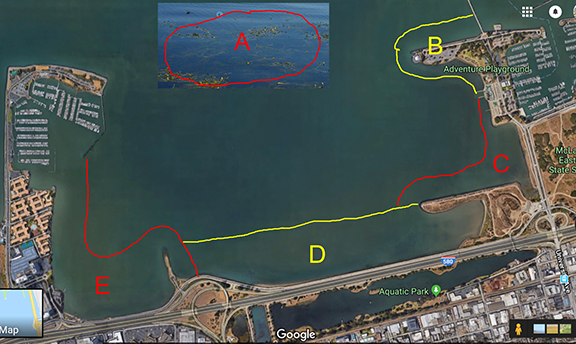
- Sand bar (when <4ft)
- Shorebird Beach
- Toilet Bowl
- Ashby Shoal
- Emery Point
- What is the best way to carry the foil board?
- Board over your head with the foil in front of you
- One hand on the footstrap and one on the foil mast
- Carry the board and foil separately; then assemble at the dock.
- What is the safest way to put the foil board into the water from the dock? Se
- Nose first, lift the board and slide it into the water
- Tail first; place the foil in the water and then slide the board in.
- Flip the board over with the foil in the air. Then slide the sail and board into the water.
- Place the board on its side. Then slide the sail and board into the water.
- When swimming near the foil, how should you position your body?
- Vertical, with legs straight
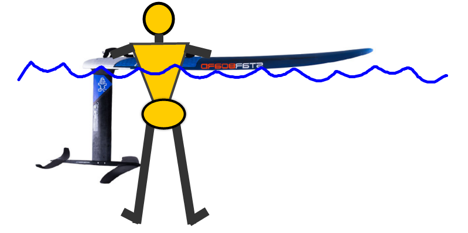
- Vertical, with legs bent at the knees
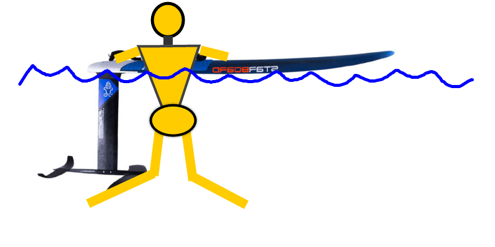
- Horizontal, on your stomach
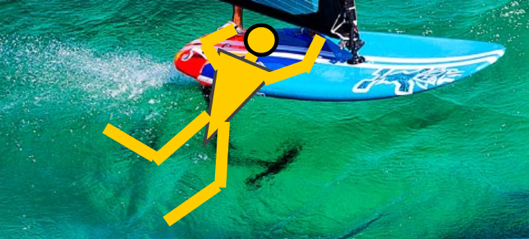
- Any of the above
- Vertical, with legs straight
- Select all of the safe methods to get the sail out of the water during a waterstart
- Lift sail at the tip
- Legs straight; Back hand on footstrap; front hand on mast; sweep the sail overhead.
- Legs bent; Back hand on footstrap; front hand on mast; sweep the sail overhead.
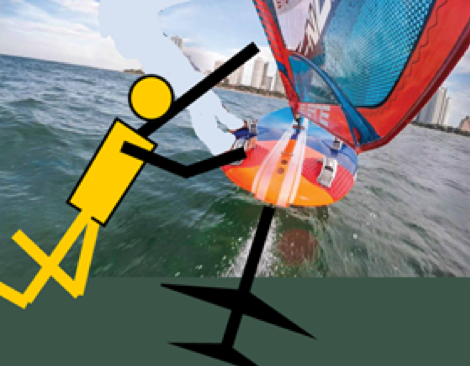
- Lift sail at the tip
- Which of following is a safe way to position your feet during a waterstart?
- Back leg on board; front leg in the water
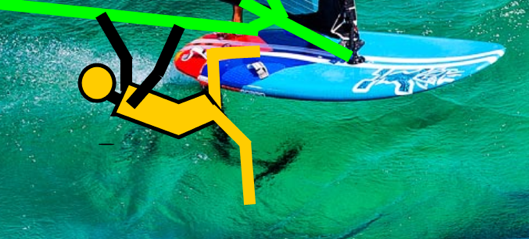
- Front leg on the board; back leg in the water
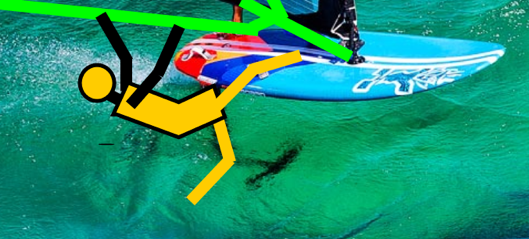
- Both legs on the board
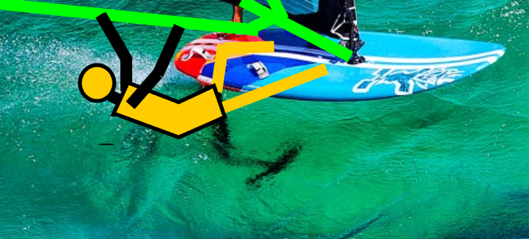
- Back leg on board; front leg in the water
- When catapulting, what should you do to protect yourself and the equipment?
- Hold onto the boom
- Hold onto the boom and pull it into your body
- Let go of the boom and cover your head
- Do nothing; let gravity do it’s work
- How should you place the board on the padded rack?
- With the mast touching the padded bar
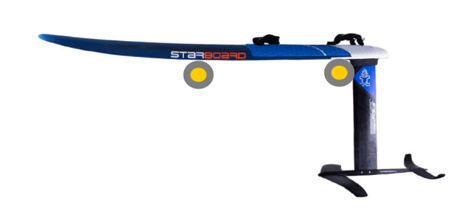
- With the mast not touching the padded bar
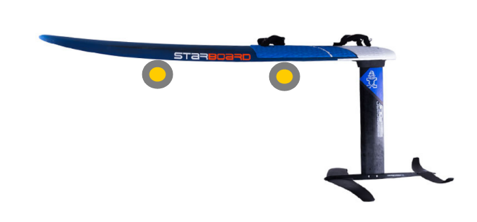
- With the mast pointed up
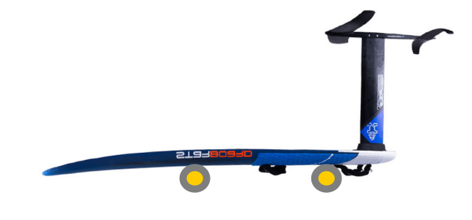
- Vertical, with the board leaning against the bar

- With the mast touching the padded bar
- What is REQUIRED to achieve the F rating?
- J+ rating
- Pass written test
- 2 additional hours volunteer service
- All of the Above
- What is the best way to park the foil board on the dock when it is unattended? (The dock has padded rails)
- Foil up on top of the dock

- Foil in the water, tucked against the dock, upwind side
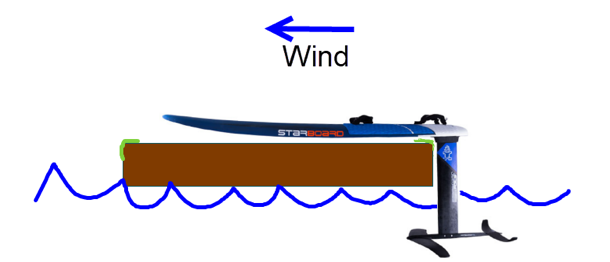
- Foil in the water, not tucked against the dock, upwind side
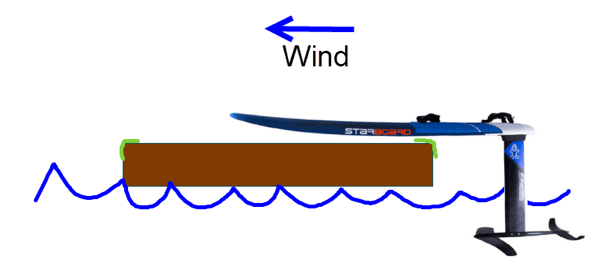
- Foil in the water, tucked against the dock, downwind side
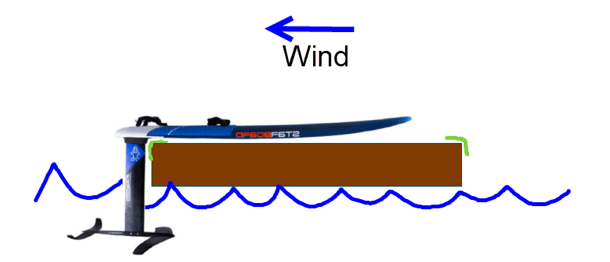
- Foil in the water, not tucked against the dock, downwind side
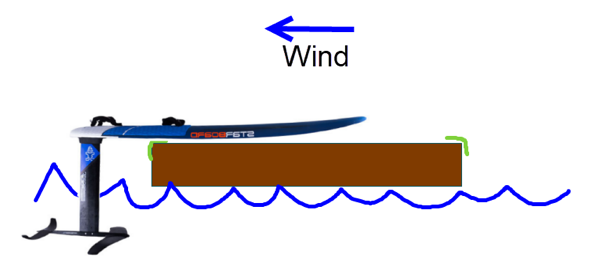
- Foil up on top of the dock
- What is the safest way to take the rig out of the water?
- Pull up the board from the rear by the straps, then rotate the sail onto the dock.
- Pull up the board by the nose, then rotate the sail onto the dock.
- Tilt the board on its side, grab the foil mast and pull the board onto the dock. Then rotate the sail onto the dock
- How do you fly the foil in low wind (<10 mph)?
- Use a big sail ( > 7m2)
- Go downwind
- Pump the sail effectively
- Pump the foil effectively
- All of the above
- Describe the ideal body position when flying on the foil?
- Upright; Back heel locked down; Front leg bent
- Slanted; Leaning out over the water
- Figure 7 stance; weight on back foot
- While planing, how do you get the foil to ascend?
- Weight on back foot and bring the sail back
- Weight on front foot and press down on the mast
- Press your feet on the rail to tilt the fin
- Go downwind
- Go upwind
- How do you get the foil to descend in a controlled manner?
- Weight on back foot and bring the sail back
- Weight on front foot and press down on the mast
- Sheet out
- Go downwind
- Go upwind
- What is the safest way to come to a stop when flying on the foil?
- Sheet out hard.
- Fly out of the water with the foil and land (ie. Do a chop hop)
- Steer upwind and then into irons.
- Descend first. Then sheet out or go into irons.
- Which of the following moves can lead to catapults? Select all that apply
- Not hooked in when fly
- Flying out of control
- Tilting the mast toward the nose past vertical
- Diving the nose into the water
- Plowing into the mud with the foil while planing
- If the tide is 3 ft and the foil is touching mud, how should you leave the dock?
- Sail out
- Walk the rig out dragging the foil through the mud until there’s sufficient clearance
- Flip the board over so the foil is pointed skyward, then walk out until there’s sufficient clearance (typically ⅔ of the way to the restaurant)
- Which of the following should you be cautious of or avoid sailing into with the foil?
- Brown areas in the water
- Dark weed patches in the water
- A flock of birds sitting in the water
- Buoys
- All of the above
- When overpowered, what is a safe and fast way to get back to the dock?
- Fly back.
- Signal for help and hope for a tow.
- Slog/plane back, keeping the board in contact with the water.
 Cal Sailing Club
Junior Skipper Sailing
Written Test - French Version (sorry, this version is untranslated)
Directions:
Select the appropriate answer for each question. Closed Book - 21 questions - you must answer at least 17 questions correctly to pass.
The wind direction is from the top of the page to the bottom. Diagrams are drawn from a top-down bird's-eye perspective.
Test Conditions:
There is a time limit of 30 minutes to complete the test This is intended to be a Closed Book Test. You are on your honor not to consult any other sources or people while you are taking the test.
Results
After you complete and submit the test, you will see whether you passed. If you passed, you can and should review your incorrect answers. Many answers have a detailed explanation for the correct answser. If you did not pass, you will not be able to review your answers.
If you pass, this will be noted in your white card in the clubhouse within a week.
- Which part of the boat needs most attention when using the hoist?
- Battens
- Spreaders
- Jibsheets
- Club Rules allow Junior Skippers to ...
- Use the gennaker on the Quest
- Drive the rescue skiff
- Give lessons on the dinghies
- After you put a Quest in the yard, you should make sure the...
- Jib halyard is pulled tight
- Forestay lever is opened
- Outhaul cleat is unlatched
- Which of the following activities do NOT require wearing a PFD (lifejacket) under club rules?
- Sailing a club Laser while wearing a wetsuit
- Paddling a club kayak
- Driving a car
- If a windsurfer might collide with your boat and you have right-of-way, the FIRST thing you should do is ...
- Jibe
- Yell to them while holding your course (keep sailing in the same direction)
- Tack as soon as possible
- Turn towards port
- If your main halyard gets uncleated and you can't sail back to dock, what should you do?
- Signal for a rescue by standing and waving your arms up and down at your sides and over your head
- Anchor and try to fix the problem; signal for a rescue only if you can't fix it
- If your crew starts to shiver, the FIRST thing you should do is to ...
- Have them put on a hat
- Have them drink water
- Have them exercise
- True or false: The dayleader can prohibit any member from sailing and windsurfing at any time, and can suspend a member's sailing privileges for 36 hours for a violation of club rules.
- True
- False
- True or False: Club boats are unavailable for personal use during Open House or scheduled lesson times without special permission of the Dayleader.
- True
- False
- How many hours are members required to work every 3 months of membership
- One
- Two
- Four
- Which of the following is an indication that you should reef?
- the windward telltales on the jib start luffing
- The centerboard starts coming up
- The boat heels more than 20° when you're fully hiked out and the mainsail is luffing
- The wind is over 5 knots
-
Which boat has right of way?

- Which is the more accurate way to determine whether your boat is on port or starboard tack?
- The side of the boat that is wind is coming from
- The opposite side of the boat from that which the mainsail is on
- To get the most power from the sails on a reach (wind coming over the side of the boat - not from behind), you should ...
- Pull in the sheet for a broad reach, let out for close-hauled, and center the boom when on a run
- Let the sails out until they just begin to luff, them pull them back in until they just stop luffing
- Tension the battens until the leech is curved, and keep the vane centered in the windex
- Which of the following makes it hardest to steer (and can cause damage)
- Rudder downhaul cleated too tight
- Centerboard too far down
- Rudder not all the way down
- Outhaul too tight
- Which of the following is best for slow sailing (for example, when approaching the dock)?
- Beam reach
- Close reach
- Broad reach
- When teaching lessons, it is generally best to ...
- Give as much of a talk as you can about sailing theory
- Sit near the mainsheet cleat and avoid taking the helm or hiking out
- Only take one student at a time, and just have them work the jobsheet and hike out while you take the helm
- If the cockpit in a Venture is covered by water, which of the following should you check?
- Hull drain plugs
- Rudder downhaul
- Cockpit seals
- If you have trouble righting a boat after a capsize, you should ...
- Raise the centerboard
- Point the bow away from the wind
- Anchor and pull the sails down
- Who is responsible for making sure that the dinghies are safe to sail and for repairing any damage that may occur while the boat is checked out?
- First Vice Commodore
- The member who checks out the boat
-
Which of the letters (A, B, C, or D) on the map below is in the Junior Skipper Area?
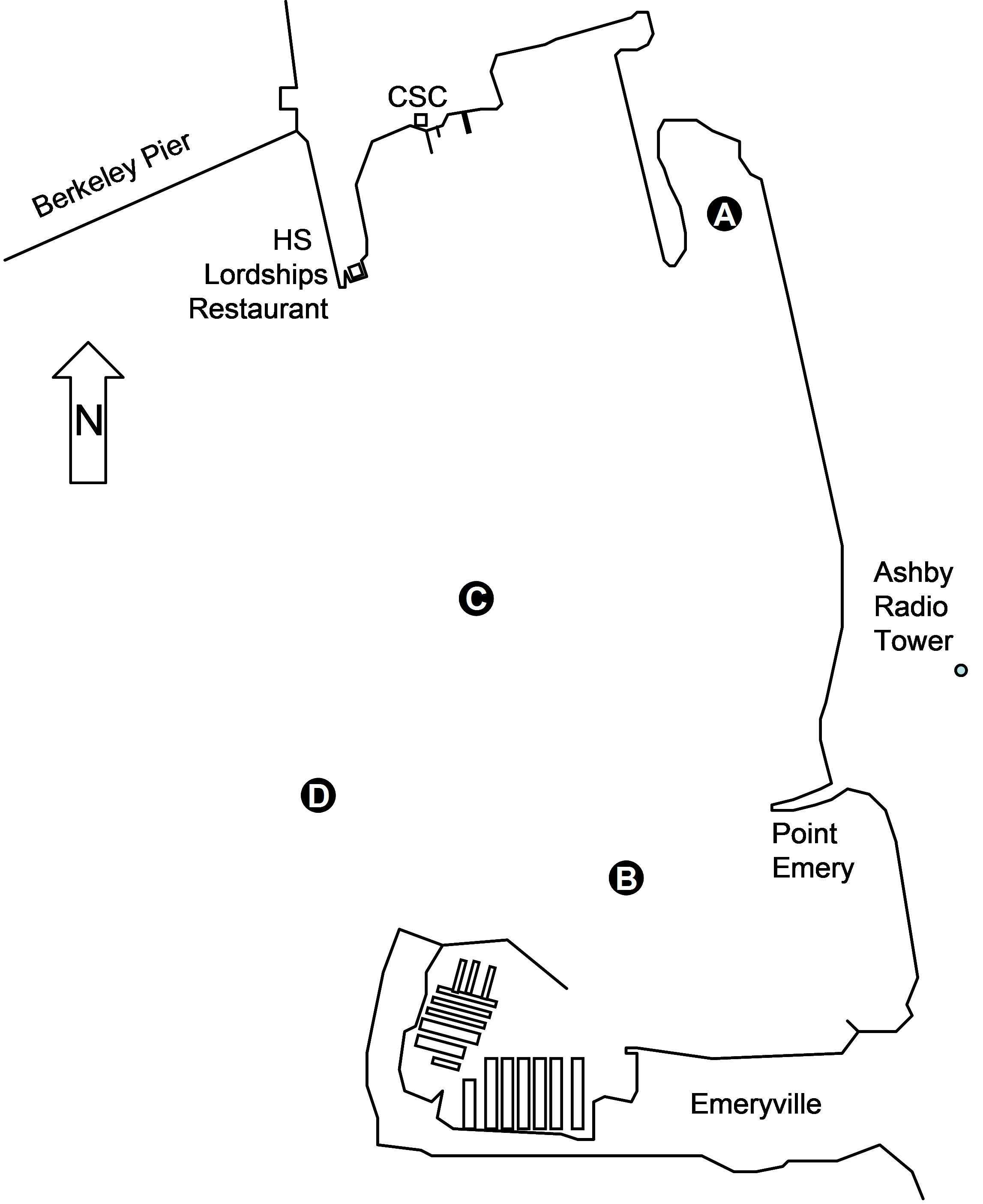
So, You’re a New Junior
Congratulations! Thank you for your hard work and dedication to Cal Sailing Club and becoming a Junior. We’re extra glad you are here because the Cal Sailing Club needs your help.
This document is designed to make your transition from newbie to seasoned and prepared Junior skipper as easy and as safe (for you and for your students) as possible.
Overall, the club grants its member a lot of freedom. Each skipper does things in his or her own way in the grand scheme of things. However, there are guidelines which make your volunteer hours easier for you and more helpful for your students.
Please read through this entire document and familiarize yourself with the many resources that will help you become the best teacher and the best junior skipper possible.
RESOURCES ALL JUNIOR SKIPPERS SHOULD REVIEW
- Operating Rules (you’ll want to know these basics well) https://www.cal-sailing.org/images/stories/files/club_docs/CSCOperatingRulesrev073017.pdf
- Dinghy Manual (learn it, know it)
https://www.cal-sailing.org/images/stories/files/Dinghy13.pdf
- Dinghy Sailing Instructor Resources: https://cal-sailing.org/lessons-menu/lessons-sailing/dinghy-instructor-resources
- How to Teach Dinghy (super helpful stuff here)
https://www.cal-sailing.org/images/stories/files/How%20to%20teach%20dinghy%20-%20Mike%20Sherrell.pdf
- Basic Sailing Instructions Syllabus
- Ground School Basics (super helpful for Saturday Morning lesson time)
https://www.cal-sailing.org/images/stories/files/Ground%20School%20Teaching%20Outline.pdf
TEACHING LESSONS
Scheduled lessons are held three times per week. (Private lessons are at your own discretion within open club hours.)
- Saturday from 10-1
- Monday from 1-4
- Thursday from 1-4
Saturday lessons are run by an onsite coordinator who will match you up with students from the sign up list.
LESSON PROCESS
- When you arrive at the club, sign in on the skipper sheet and pick out a boat from the yard. Check the dinghy log (for issues or DNS) and then sign out your boat.
- Once the coordinator has assigned students to you - you will guide them in rigging the boat and putting it into the water.
- Ask the students about their lessons and skills so far and pick a lesson from the “How to Teach Dinghy” lesson plans
- Plan to give each student 15-20 minutes of tiller time. Your total lesson should be about 60 minutes (to make time to return for another lesson).
- Check with the Organizer to see how long the list is and how quickly they need you to return for students - some days may be more leisurely and some may need you to keep a tighter schedule
- When you return to the docks - let the Organizer know you are ready to take out another lesson group
- At the end of lesson time you will be responsible to guide your current students as they put the boat away and sign it in (or ‘sell the boat’ and sign it in).
Monday and Thursday lessons are organized by the skippers themselves. You will follow the same process as above.
*During lesson time, CSC members have priority over nonmember guests. Students are taken in the order they sign up at the clubhouse. If you bring a guest during lesson time they should be a member and be signed in in order to go on a lesson with you. All students will be served in the order they sign up, so if you want someone to go with you, arrive early and get your preferred person signed in early.
OPEN HOUSE
New Juniors are asked to do additional training and preparation before skippering in open houses.
Open House is very different from normal lessons. Open house guests are not there to learn how to sail - yet. Additionally, the public is significantly less knowledgeable than your normal students and often less able to respond to instructions while under sail. They are not reliable to run the jib sheets or to shift their weight as needed.
Regardless of conditions - you run a higher risk of capsize or even a passenger taking a boom to the head. These passengers often create additional challenges after a capsize when they panic and climb on the mast, drift away from the boat and generally freak out.
While we encourage new juniors to participate in Open House. We do not expect you to go immediately from passing your junior test to solo skippering under the challenging conditions of Open House.
Use the instructions below to level up your skills and experience to be able to safely work open house. Individual permissions are granted by the Open House Coordinator on site that day.
INSTRUCTIONS FOR NEW JUNIORS AT OPEN HOUSE
- Practice singlehanding the boat you plan to use. Be able to sail and tack with the jib furled. Be able to quickly and efficiently capsize recover and assist others into the boat.
- Practice your dock talk, especially your instructions on capsize (stay with the boat, stay calm, do not climb up the mast)
- When you sign in, tell the Open House Coordinator that you are new to open house. They will partner you with another junior skipper. After you have more experience at open house and a proven track record, you will be able to get permission from Open House Coordinator to solo skipper.
- Tell the open house coordinator if you do not have a radio. We will need to find one for your boat.
- Take a little more time if needed. While things feel very “busy” during open house, we would rather you slow down and be safe than push yourself.
A DISCUSSION OF CAPSIZE
Capsize is to be highly avoided at open house. How can you diminish risk of capsize? Be mindful of conditions. For example, reef early if winds rise during the afternoon. Under heavier wind conditions you may consider staying in the novice area (even if that means that winds are slightly more unpredictable in the wind shadow of the restaurant) or keeping the jib furled. Consider staying closer to the dock so you can return easily or reached by the rescue skiff more quickly.
Do not skipper if you are scared or uncertain if you can handle the situations which may arise given conditions.
WHAT TO DO IF YOU CAPSIZE AT OPEN HOUSE
- Radio for help immediately.
- Account for all your passengers.
- Remind your passengers to be calm and hold on to the boat. Do not let them climb on the mast or the boat may turtle.
- After the skiff has rescued your passengers, return to the dock and come find the Open House Organizer to debrief what happened and what you can learn from the experience. The Open House Organizer will determine if it is appropriate to return you to sailing that day.
IMPROVING YOUR SKILLS: The Path to Becoming a Badass Junior and Potential Senior
Most Junior skippers take a bit of time digging deep into the art of sailing and getting to know all the ins and outs of the clubs.
There are some great resources that will help you learn and apply the many many theories and concepts that underpin the art of sailing.
- Review Sailboat Skipper Rating System: https://cal-sailing.org/ratings-menu/rating-for-sailboat
- Advanced Dinghy Lessons are given (Monday 5-8) during peak months
- Schedule a private on-demand lesson with an advanced skipper
- Keelboat Lesson are offered on Wednesday nights and will allow you to practice with senior skippers with new parameters
- Sunday and Thursday Night Racing (11-1 each Sunday and 5 pm Thursday during peak months) will help you learn how to use the wind to move with much more intention and tactical awareness.
- Take a basic Windsurfing Class and learn how to sail in a new way
- Read up online:
- Read some of the many sailing theory books in the clubhouse
- Become a Volunteer Dayleader (by contacting the Port Captain)
If you have questions or need more guidance, please contact:
- Vice-Commodore, Mary Lucus Flannery (maryflan@gmail.com) - that's me! - is happy to address questions about open house or in general ideas about the onboarding of juniors
- John Bongiovanni is the master (simply incredible!) for getting instruction tips and guidelines (jbong@mindspring.com)
- Lesson Coordinator, Birk Huber (birkhuber@gmail.com) is available for questions about Saturday lessons
Thanks for reading! Feel free to reply to me separately with feedback.
Mary
Co-Vice Commodore
Cal Sailing Club 
JUNIOR Windsurfer
Written Test (revised 10/17)
Directions:
On the answer sheet, mark the most appropriate answer for each question.
Closed book – 30 Questions – You must answer 27 questions correctly to pass.
The wind direction is from the top of the page to the bottom. Diagrams are drawn from a top-down bird’s-eye perspective.
Good luck!
Part I: Club Rules
- When are regularly scheduled windsurfing lessons held at the Cal Sailing Club (CSC)?
- Only on Saturday’s at 10:30am.
- Only in the summer on Sunday at 11am.
- Almost every day at 2:00 PM.
- Saturdays at 10:30am and, from April to October, also on Sundays at 11am.
- Which tests are required to advance from Novice to Junior?
- This written test only.
- This written test and a practical sailing test given by a senior windsurfer.
- This written test, a rigging test, and a practical sailing test given by a senior windsurfer.
- This written test, a rigging test, a practical sailing test, and another written test on the CSC by-laws.
- Which of the following is true about the Junior windsurfing practical sailing test?
- It is done in winds under 10 knots.
- It can be given by all J+ and Senior windsurfers.
- It includes demonstrating the ability to sail upwind and tack in the swell.
- It includes demonstrating the ability to waterstart and carve jibes.
- What’s a good way to find work projects to fulfill the quarterly work requirement?
- Ask the Dayleader.
- Check the white board in the clubhouse.
- Ask the Second Vice Commodore (the club officer in charge of windsurfing equipment).
- Do all of the things listed in the other answers: ask dayleader, check white board, AND ask 2nd .
- What is the work requirement for advancing from Novice to Junior?
- Complete only the 2 hour quarterly requirement before getting the new rating
- Complete both the 2 hour quarterly requirement and 2 additional hours before getting the new rating.
- Complete the 2 hour quarterly requirement before getting the new rating and then 2 additional hours afterwards.
- None.
- When can you give on-the-water windsurfing lessons to non-member friends on CSC equipment?
- If there are no members waiting to use the boards.
- Never
- If you have a Junior rating.
- If you have a Senior rating.
- How can you earn a free quarterly membership?
- Only by teachinig 10 hours of Saturday/Sunday morning windsurfing lessons.
- Only by contributing 10 hours as a volunteer dayleader after being trained.
- Volunteer 10 hours beyond the normal quarterly requirement, including teaching, volunteer dayleading, board repair, and approved work for club activities.
- Windsurfers cannot earn free memberships.
- For Junior and J+ windsurfers to sail, which condition(s) are necessary?
- The wind is under 30 knots.
- The dayleader has not canceled day sailing.
- The skiff is in water and operational.
- All of conditions listed in the other answers.
- If CSC equipment is damaged while you are using it. Which of the following is true?
- Just leave damaged boards on the racks behind the clubhouse.
- Just leave damaged sails in the clubhouse with the dayleader.
- You will be required to pay up to $100 for the damage, depending on the cost of repair.
- You cannot sail again until the repair is done or you have explicit permission from the dayleader or a CSC officer. You must put a note on the equipment, tell the dayleader, and also place a note in the dayleader’s log
Part II: Windsurfing Theory and Safety
- Junior, J+, and Senior windsurfers on CSC equipment must wear a life jacket…
- At all times.
- At all times, except Senior windsurfers.
- At all times, except when wearing a harness and full wetsuit.
- Only when the wind is over 20 knots.
- In extremely high wind, if nothing else works, what should you do to self-rescue?
- Use flares and radio for help.
- Abandon the sail and paddle to shore on the board.
- Abandon all equipment and swim to shore.
- Make out your will (in waterproof ink).
- Which of the following makes it easier to turn downwind on a longboard (a bigger board with a centerboard)?
- Tilting the mast back over the rear of the board.
- Moving the mast track to the rear of the board.
- Lowering the centerboard.
- Raising the centerboard.
- Which of the following is true of shortboards (a smaller board without a centerboard)?
- They are most stable at slow speed.
- You can point higher upwind on a shortboard than on a longboard.
- Sinking the windward edge helps them sail upwind.
- They handle the same as longboards.
Part III: Sail Handling and Dock Etiquette
- Which is the best way to carry a sail relative to the wind?
Remember, the wind is blowing from the top of the page to the bottom as shown by the arrows on the left.
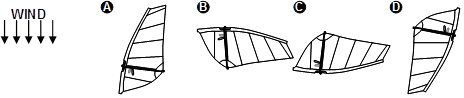
15. When you are finished sailing you should…
- Put away your board and rig after rinsing it off.
- Give your board and rig to someone else making sure they sign it out.
- Sign in at the dayleader’s desk. Turn in your universal, unless someone else has signed it out.
- Put away your gear properly OR give it to another member and make sure they sign it out AND sign in
16. Which is the best way to put your board on the dock while you get or return your sail?
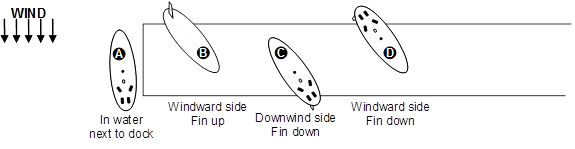
17. Where is the safest place to depart from and return to the dock?
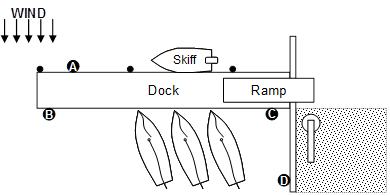
18. Where can you leave a rigged sail unattended for a few moments?
- On the carpeted area by the hoist.
- On the carpeted area behind the clubhouse.
- On the dock while getting your board.
- On the dock, by the hoist, OR behind the clubhouse.
Part IV: Sailing Terminology
Questions 19-22 refer to the drawing below. Look carefully what tack each board is on before and after the turn.
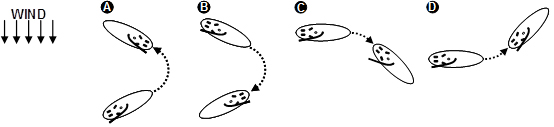
- Who is jibing?
- Who is falling off?
- Who is heading up?
- Who is tacking?
Part V: Right of Way Rules
|
23. Who has right of way? A) P because it’s smaller. B) P because it’s under sail. C) Q because it’s larger. D) Q because it has restricted maneuverability. |
24. Who has right of way? A) R because it’s overtaking S. B) R because it’s downwind. C) S because it’s being overtaken by R. D) S because it’s on port tack. |
|
25. Who has right of way? A) T because it’s larger. B) T because it’s on port tack. C) U because it’s smaller. D) U because it’s on starboard tack.
|
26. Who has right of way? A) X because it’s windward. B) X because it’s on a beam reach. C) Y because it’s downwind. D) Y because it’s on a close reach.
|
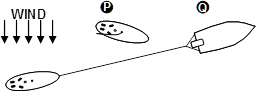
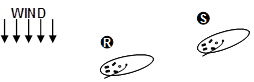
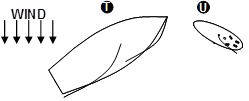
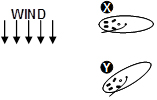
Part VI: Rigging
- If you find a large rip in a sail you haven’t used, you should…
- Rinse it, let it dry it, and put it in the repair area.
- Put a note on the sail and in the logbook.
- Rinse it, derig it, let it dry out, put it in the repair area, AND put a note on the sail and in the logbook describing the size and location of the sail.
- Sail with it and put it back where you found it.
Part VII: Windsurfing Boundaries
Questions 28-30 refer to the drawing below…
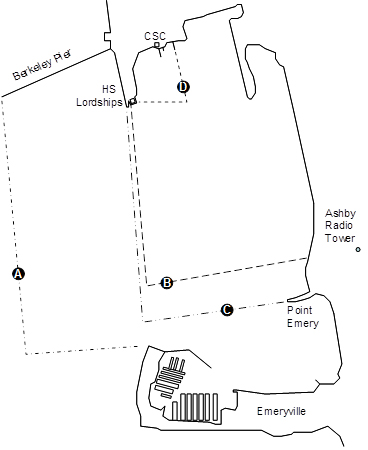
- Which is the Novice windsurfer boundary?
- Which is the Junior windsurfer boundary?
- Which is the Junior+ windsurfer boundary?
Join the greatest community of sailors and windsurfers in the San Francisco bay
Become a proficient windsurfer or a salty sailor with the help of other Cal Sailing Club community members!
Join now to enjoy free sailing and windsurfing lessons!
If you are a member and want to renew, login to the site and click on the Renew Now button in the upper right.
Membership costs just $120 for 3 months ($99 for students and seniors) plus 2 hours volunteer work. Sailing lessons and windsurfing lessons are free with membership, and there are no charges for equipment use, cruises, or other club activities.
Members can take unlimited lessons at no additional cost, and once they have proven their sailing/windsurfing ability, members can take out boats and sailboards without limit.
If you are paying for your membership with a credit card, do that here. This will go through PayPal, and you can use your Pay Pal account it you have one, but you can also just use your credit or debit card. Paying with PayPal activates your membership instantly.
Memberships start when they are activated. We don't have an easy way to delay the start of your membership, but you can plead with the Treasurer. Best is to pay with Paypal the day you are ready to use your membership.
Become a member today!
If you are a member, you get 4 work hours credit for referring a new member who registers and buys a membership subscription. Just tell them to list you as the referrer when they sign up.

Open House: Introductory Sails at the Cal Sailing Club
124 University Avenue at the Berkeley Marina
www.cal-sailing.org (no phone: we like it that way!)
Ever wonder about those dazzling sails buzzing around on the Bay? The Cal Sailing Club monthly Open House/Introductory Sail gives you a chance to find out! Cost: zero. Fun: limitless.
The Cal Sailing Club (CSC) offers sailing to the public aboard our fleet of keelboats (large and stable) and dinghies (fast and zippy, but kinda tippy) ten times a year. Whether you are new at sailing or an “old salt,” you can enjoy a spectacular voyage within sight of the University of California, the Bay Bridge, San Francisco, and the Golden Gate!
CSC is an independent, non-profit cooperative; our popular Open Houses are a great way to get a free sail of around ½ hour in one of the most beautiful settings on the planet -- and to learn about boat and waterfront safety, Bay ecology, and the fun of non-motorized watercraft.
Dates for 2026 Open Houses
Will be published here in early 2026.
Almost all Open Houses are held from 1-3 pm Sunday afternoons (and sometimes on Saturday to coincide with other activities at the Marina). Sign up in front of the club house between 1-2:30. Full schedule is above.
How can I sign up?
Rides are given on a first-come-first-served basis by volunteer CSC members. Please try to arrive at 1 pm when the signups begin at the table. On nice days we get lots of visitors. If the tide is dropping, we may have to end sailing earlier than 3 pm, though we try our best to get everyone aboard.
Is it safe?
One of the main reasons we do this is to teach the safest possible boating practices, including the most important--always wearing a personal flotation device (lifejacket) when boating. Nonetheless, there is some risk inherent in sailing, including the possibility of ending up in the water if your dinghy tips over. We require all participants to sign a waiver (click here to read the waiver for those 18 years old and older; click here to read the waiver for parents and guardians to sign on behalf of their children under 18) stating that they understand that there are risks that they are voluntarily taking on. Our skippers are trained in safe boating, and we have radios and a rescue skiff standing by in case help is needed.
Can I bring my children?
Children must be at least 5 years of age and accompanied by an adult. We recommend that first timers, small children and not-so-agile adults sail in our larger keelboats.
What should I wear?
Bring a strap for eyeglasses or sunglasses, a string to hold your cap on, shoes that can get wet (better avoid flip flops) and comfortable clothes including a windbreaker. A change of clothes can come in handy in case you get soaked. You can borrow our foulies (heavy raincoats) and a PFD (life jacket, required).
The weather looks iffy. At what point do you cancel the event?
CSC’s first priority is boating safety. If we get heavy rain or excessive winds, we may cancel. There’s always next month!
Where are you located?
CSC is just east of the Shorebird Center, at 124 University Ave. on the Berkeley Marina, facing Emeryville, about ¼ mile before the Berkeley Pier. There’s plenty of parking for cars and bikes, and AC transit stops just opposite the club. Be sure to ask the bus driver if the bus goes to the Marina.
What is it like?
You can go on a Virtual Open House by clicking on the video below
Welcome Aboard!
Blogs on Sailing Skills and Theory
Over the past several years, club members have contributed blogs to the CSC on different aspects of sailing theory or technique. These blogs are an incredible resource for those learning to sail and also for experienced sailors. These blogs are discussions about particular subjects, and they assume some sailing knowledge (refer to CSC Dinghy Sailing Manual).
These are the blogs. You can contribute by writing one on a subject of interest.
General Interest
Clothing for Sailing
What to wear when you're sailing hard, along with some fashion tips. Read Blog
Getting Ready for a Keelboat Launch
A check list of getting a keelboat, yourself, and your crew and guests ready for a safe sail on a club keelboat. Read Blog
Stepping Off a Dinghy with Style
Going forward quickly and stepping off onto the dock. Essential for single-handing. Read Blog
Using the Hoist
Basic and advanced, including putting the boat in and taking it out single-handed. Read Blog
Using your Radio
How your radio can help you in routine sailing (not an emergency). Read Blog.
Sailing Skills
Gybeing and Downwind Sailing
How to sail in the downwind "zone of death" and not capsize. Read Blog.
The hows and whys of controlled gybes. Read Blog.
Finess your gybe by separating it from the turn.
A nice teaching/learning technique to nail your gybes. Read Blog
Capsize Recovery
Some practical advice on getting the boat upright the first time in the wind and the waves. Read Blog
Dry Capsize on a Quest
It's more difficult than a Bahia because of the hull shape, but you can do it. Read Blog
Crew Overboard
Some different ways to do COB with advantages and disadvantages of each. Read Blog
Slow Sailing Theory and Practice
Including how to recover when your course is off. Read Blog
Learning and Teaching Small Circles
Step-by-step approach to learning and teaching the most difficult Junior skill. Read Blog
Update to the post on the gybe part of the maneuver. Read Blog
Basic upwind sailing and how to teach it
How to trim sails for upwind sailing, with diagrams.Read Blog
The Two-Handed Drill for dealing with Puffs and Lulls
Frank Bethwaite's technique that works well in teaching basic students. Read Blog.
Launching Dinghies on a Crowded Dock
Lessons from a "Between the Docks" workshop. Read Blog.
Can You Slow Sail?
How to use this technique effectively in dinghy docking, MOB, and keelboat docking. Read Blog.
A Useful Knot including Single Handed Dinghy Departures
The Highwayman's Hitch and how to use it departing from the dock. Read Blog.
A Rudderless Technique Demonstration
"Boat on a Rope" shows how boat lean causes a boat to turn. Read Blog.
On the Trapeze
How to Skipper with Crew on the Trap
Your skills as a skipper have a large effect on your trapezing crew's comfort level and safety. See how to make your crew happy. Read Blog
Single-Handing on the Trap
A real test of your sailing skills (and fashion sense). Read Blog
High Wind Sailing
Using your Weight in High Winds
The forces on the boat, why and how to best use your weight in high winds. Some practical techniques to depower the wind's heeling force. Read Blog
Single Handing in High Winds
More tips to overcover your weight deficit when you're by yourself. Read Blog
Sailing in 30 Knots
What to do when you've bitten off more than you can chew, wind-wise. Handout from an Advanced Dinghy class. Read Blog
Advanced Skills
Flying the Gennaker
Everything you need to know to setup, hoist, douse, and sail with a gennaker on our dinghies. Note that use of gennakers is restricted to Senior Sailors. Read Blog
Rudderless Sailing
You've read the theory, but how do you actually do it? Practical advice on key maneuvers rudderless. Read Blog
Sailing by Feel
Sailing blindfolded? Way! Learn to use your other senses in handling the boat. It will pay off even when you can see everything. Read Blog
Low Tide Docking
How to dock in low tide, when the usual approach doesn't work. Read Blog
And a small but important point. Read Blog
And some pointers when the tide is low but not extremely low. Read Blog
Launching and Docking in East Winds
Common in the winter, so how do you do it? Read Blog.
Keelboat Skills
Keelboat Dockiing
A multi-part discussion of this critical Senior skill.
Part 1 - Planning and Preparation. Read Blog
Part 2 - Space is Time. Read Blog
Part 3 - Planning a Bail-Out Read Blog
The Quick Stop COB Maneuver
How to do this maneuver, developed by the US Naval Academy a few decades ago Read Blog
Navigation
Ranging
A 5-part discussion of a powerful and simple navigation technique
Part 1 - What ranging is and how to use it to cross a current
Part 2 - How to use it to determine whether your course will clear a point
Part 3 - Determining your position
Part 4 - Avoiding a collision
Part 5 - Busting a myth on a particular incorrect use of ranging
Sailing Theory
Apparent Wind
A three-part discussion of apparent wind, a difficult but important concept.
Mainsail Tell-Tales
Most sailors know how to use the jib tell-tales, what what about the main tell-tales? Read Blog
Anchoring
A nuanced discussion of why you shouldn't rely on your anchor and how to avoid having to use it. Read Blog.
Rigging
How to reef a main sail
VHow to do it properly to get better boat control and not damage the sail. By Saul Schumsky and Jack Chen. Watch Video.
The "Mystery Ring" on an RS Venture
If you don't know about this ring and don't check it every time you go out, you could be in big trouble. Read Blog.
Bahia Reefing Line
How to rig a Bahia reefing line properly. it's actually quite simple. Read Blog
Fitness for Sailing
Chin Ups
A powerful exercise that can pay off in dinghy sailing. Read Blog.
The Dinghy Log is now online, replacing the paper binder in the Clubhouse. So you can easily check the status of the dinghy fleet from anywehre you have a browser and an internet connection. You can also enter issues, upload photos for an issue, record work hours, and record issues fixed online.
Go to Resources->Dinghy Log on the website, and you'll get a dashboard of all boats, with colors indicating status and a list of open issues. You can instantly see the status of all of our dinghies. If you are not logged into the site, you will see all boats with active issues.
To see the issue details, to add or edit issues, to upload photos, or to add work time to an issue, you must be logged into the web site.
To enter an issue, click on the boat in the Dashboard. Then click on New Issue, enter the details, and Submit. To edit an issue, click on the the issue in the Dashboard and then on Edit Issue. Note that you can specify DNS (Do Not Sail) and Fixed, as appropriate. If you specify DNS as yes, and Fixed as no, the boat will appear RED on the dashboard; if you specify DNS as no, and Fixed as no, the boat will appear YELLOW
To add a photo to an issue, click on the issue in the Dashboard and then on Add Photo. You can select a photo an upload it. Only certain types of files are accepted, and the photo will be resized on the server.
To record work on an issue, click on the issue in the Dashboard and then on New Work. Enter what you did, how long you worked on it, and whether you fixed it. It will automatically enter the hours as Volunteer Hours unless you uncheck the box to do so. It will not approve the hours.
All activity will be emailed automatically to the First Vices.
Just to be clear, this has now replaced the paper binder, which you should no longer use.
If you run into any problems, click on Contact Webmaster on any web page and send the details.
In a cruise announcement, you often want to include URLs to related information on the web. You can, of course, type the URL into the announcement. A member can copy and past the URL into their browser to get to the info.
But there's a neater way to do that, which is to embed hot links into the announcement. This is how you do it.
When you create or edit a cruise, you use a special editor for the cruise information. Let's say you're doing a cruise to the German restaurant Brotzeit on the Alameda Estuary. You'll type in some information, like this:

You can change Brotzeit to a hot link, which means that when someone clicks on it, they are taken directly to the URL you specify. First you have to select the word Brotzeit by the usual methods (double clicking, highlightiing with your mouse, etc.). You can selecct multiple words, if you want:

Next you click on the Link icon in the editor controls:

This will give you a popup window where you can enter the URL:

There are two fields here you need to set. One is the URL you want to display when the user clicks on Brotzeit. The other is the Target, which you should set to "Open in New Window". The click on Insert, and you have it:

Here you see Brotzeit highlighted as a hot link, which is how it will appear in your announcement.
You can have as many hot links as you like in your announcement. Create each of them this way.
The Club doesn't teach to a standard, and it is different in this way from most other sailing schools. Each instructor needs to figure out how they can best instruct the students they get. This has advantages and disadvantages, of course. The biggest advantage is that for many things, there just isn't one right way to do things. There are several possibilities, and the instructor and student need to figure out what works best for them. Being exposed to different techniques can be confusing, but in the end it can be very liberating.
Here are some documents on instructing that can help. There is also a Slack channel in the Cal Sailing workspace for dinghy instructors to discuss all aspects of instruction. Contact the Rear Commodore to be invited to the channel.
Paul Kamen's approach from almost 20 years ago is still very useful and well worth reading:
 Cal Sailing Club Basic Instructing Syllabus
Mike Sherrell's guide on instructing for new Juniors:
Steve Burt's land school workshop on body position and tiller management. An incredible workshop focused on important things that are difficult to teach on the water.
Workshop on Body Position and Tiller Management
These are John Bongiovanni's notes for an Instructor's Workshop in 2016:
Handout from Aug 2016 Instructor Workshop
Basic outline for teaching Ground School on Saturday morning lessons to beginniing students:
Comprehensive outline for teaching Ground School on Saturday morning lessons. Includes topics for more advanced students:
Ground School Teaching Outline
Another land school outline.
Club guidelines for testers administering the NoviceTest. Also useful for instructors to help prepare students for the test.
Club guidelines for testers administering the Junior Test. Also useful for instructors to help prepare students for the test.
If you have information to contribute, contact the Rear Commodore.
The Club doesn't teach to a standard, and it is different in this way from most other sailing schools. Each instructor needs to figure out how they can best instruct the students they get. This has advantages and disadvantages, of course. The biggest advantage is that for many things, there just isn't one right way to do things. There are several possibilities, and the instructor and student need to figure out what works best for them. Being exposed to different techniques can be confusing, but in the end it can be very liberating.
Here are some documents on instructing that can help. There is also a Slack channel in the Cal Sailing workspace for kelboat instructors to discuss all aspects of instruction. Contact the Rear Commodore to be invited to the channel.
Sarah Herbelin's excellent outline for teaching Keelboat Level 0 (also called the Keelboat Faire) and evaluating Level 1 (levels are described here).
Cal Sailing Club Basic Instructing Syllabus
And Sarah's excellent outline for teaching keelboat motoring, which has been part of the Senior Study Group.
Cal Sailing Club Keelboat Motoring Class
Keelboat Progression Levels are described here
There is also a Slack channel in the Cal Sailing workspace for keelboat instructors to discuss all aspects of instruction. Contact the Rear Commodore to be invited to the channel.
CSC hosts sailboat cruises to locations throughout the bay. These cruises are usually on our keelboats but occasionally are held on dinghies as well. Common destinations include the Golden Gate Bridge, the Alameda Estuary, Angel Island, and beyond. Almost all cruises are one-day affairs.
List of Current Cruises
Cruises are announced via the Club Announcments list and all current CSC members are welcome to participate (dinghy cruises will have restrictions). There are usually more members interested than spots on the boat, so members are picked randomly a few days before the cruise and notified by email.
Cruise Signup
This is how you can view and signup for CSC cruises:
Details on the sign-up procedure are here.
Setting Up a Cruise
Additional info for cruise skippers is here.
Information for Day Leaders, Excomm Members and some others – Approving Work Hours and Entering on Behalf of a Member
Day Leaders, Excomm members, and certain appointed club members can approve work hours. They can also enter hours on behalf of a member (this streamlines the process of the Day Leader's recording and approving hours).
Approving Work Hours
You must have approval permission on the site to do this.
Login to the CSC Website (cal-sailing.org).
- Navigate to Memberships->Approve Work Hours. If you do not see this subtab under the Memberships tab, you do not have approval permission.
- You will see a list of the last 100 Unapproved Work Hours entered by anyone.
- To approve an item, click its Approve button.
- You can also Edit or Delete an item by clicking the appropriate buttons. If you have questions, you can click on the person's name to send an email to them (you must be on a computer where you have an email client).
In the database, the approver will normally be recorded as the logged-in user. This is shown under Approver. If you want to approve on someone else's behalf (for example, you're logged in as VDL but you want to record your own name), change the Approver before you approve any hours. Simply enter the name you want recorded in Current Approver and click Change. Then approve as you normally would.
Entering and Optionally Approving Work Hours for a Member
To keep things simple, the Day Leader (or anyone with approval permission) can enter hours on behalf of a member and approve them at the same time. This is how it should normally work in the clubhouse.
You must have approval permission on the site to do this.
Login to the CSC Website (cal-sailing.org).
- Navigate to Memberships->Approve Work Hours. If you do not see this subtab under the Memberships tab, you do not have approval permission.
- You will see a search form under Member. Enter either the member's ID or all or part of the member's name and click the associated Search button. You will get a page (or possibly several pages) of members that match your search. Click on the member for whom you want to enter hours, and click Submit. You can also enter a different name to match and click on the Search icon.
- You will get a page with the last 100 unapproved work hours for that person, and above it a form for entering and (optionally) approving their hours.
- To enter hours, fill out the form Input Work Hours for User XXXXX. By default, the hours will be approved when you enter them by clicking the Submit button. If you want to enter the hours but not approve them, uncheck the Approved box.
That's it.
Problems?
Click Contact Webmaster on the bottom of the page and describe the problem. We'll take care of it.
Information for Members – Entering and Using Work Hours
Entering Work Hours
To enter volunteer hours, login to your account on the CSC Website (cal-sailing.org). You can do this from anywhere.
- Navigate to Memberships->Enter Work Hours
- Fill out the Input Work Hours form:
- Work Date (click on the calendar for easy date selection)
- Work Hours
- Work Item
- Optional For Approval By. If you think a specific person or group should approve your hours, enter that here. There is a drop-down menu to easily select Day Leader or Excom.
- Click the Submit button.
That's it. The Day Leader will periodically scan the site for unapproved hours. Or you can ask a Day Leader or Excomm member to approve your hours.
Until your hours are approved, you can edit what you entered or delete it completely by logging in to the CSC Website and navigating to this same page (Memberships->Enter Work Hours). It will show you the last 20 entries, latest first, along with the approval status and whether you have used these hours for membership renewal. For unapproved hours, you will see an Edit and a Delete button.
Using Work Hours for Membership
To renew your quarterly membership using workhours, you must have at least 12 approved, unused hours (the usual 2 plus an additional 10). If you are a Senior or above, you need at least 20 approved, unused hours (the usual 10 plus an additional 10). Annual membership is also available at a discount with volunteer hours. You need 38 hours for an annual membership (70 hours if you are a Senior above). This represents 10 hours for 3 quarters (discount of 1 quarter) plus 4 quarters of the usual requiement for membership.
To use hours for membership, login to the CSC Website (cal-sailing.org). You can do this from anywhere.
- Navigate to memberships->Enter Work Hours
- If you have enough hours for a membership, you will see a Use Hours button just below your membership summary. Click on it.
- Depending on the amount of unused, approved hours you have, you will see a button for Submit Quarterly and a button for Submit Annual. Click on the one you want.
That's it. This will generate an email to the Club Treasurer, who will process the renewal. Your hours will be deducted from your bank of hours automatically – 10 hours immediately and either 2 or 10 additional hours when your renewal is processed, depending on your rating. For an annual membership, 30 hours will be deducted immediately and either 8 or 40 additional hours when your membership is processed
Problems?
Click Contact Webmaster on the bottom of the page and describe the problem. We'll take care of it.
Advanced Dinghy Classes
Juniors, want to get your Senior rating? Learn the skills you need at the Advanced Dinghy Classes every Monday evening from 5pm to sunset (except when there's a Junior Fast Track, see dates above). Advanced sailing techniques taught by the best dinghy sailors in the club. Here are a couple of examples of the great classes this season: First Class and Advanced Boat Handling. Learn all the ways you can control the boat (without a rudder? no problem; without a centerboard? well, it can work; jib only? you get the idea). You'll be sailling with advanced juniors and learning from each other, as well as from the instructor. No need to sign up, just show up (4:30 or so to get the boats in the water, if possible).
In this section you will find detailed information about the input fields for creating a cruise or signing up, and learn what your inputs will be used for.
NOTE: In order to setup a cruise, you must be registered as a Cruise Skipper or Cruise Skipper Candidate on the website. If you are a Cruise Skipper but are not registered, contact the Webmaster. For giving access to Candidate Cruise Skippers click here. In order to edit a Cruise, you must be the skipper for that cruise or have been given edit permission by the Cruise Skipper.
Creating a Cruise
You can create a cruise by clicking the New Cruise button at the bottom of the Cruise List, or by clicking on a cruise and clicking Copy Cruise as New. The latter will copy the old cruise description, which you can then edit. When you click the New Cruise button, you then select whether the cruise is a keelboat or dinghy cruise. See below for how dinghy cruises are handled differently from keelboat cruises.
Fields for Creating a Cruise
Below you find the list of input fields to fill in if your are a cruising skipper creating a cruise. All fields not marked as optional have to be filled in.
|
Destination |
Short description of the location the cruise is going to. |
|
Date |
Enter the date of the cruise (month/day/year) here. Double-check the correct input. This is very important for your crew. Furthermore, the overview list on the cruise sign-up main page is sorted according to the cruise dates. |
|
Meeting Place |
Select whether the crew should meet at J-dock, at the clubhouse, or somewhere else. |
|
Meet time, Estimated return |
Specify the time for meeting the crew and your best-possible estimate of the return time. These inputs are only used for the cruise description, they are not processed in any other way. No problem to enter a return time on the next day for overnight cruises, or anything else that might fit in "we will be back about ...". You can check "Overnight", and this will be highlighted in the cruise heading and also in the cruise description. |
|
Supervising Skipper |
If the cruise is an evaluation, you can add a Supervising Skipper. Just specify the name. You can also add their email address, and they will then get any emails you send through the site to your crew. |
|
End lottery, End sign-up |
Enter the closing time of the lottery and the closing time of the sign-up here (like 2003-12-31 19:00). Please refer to section Phases of Sign-Up to learn about the effects of the times entered. This might be influenced by club rules, too. |
|
Attributes |
You can specify this cruise as Private by checking the box here. The cruise will be visible, but sign-ups are not allowed. When you create a cruise, you can disable "Allow Guest Signup", which is enabled by default. If you disable it (for example, for a dinghy cruise), members will only be able to signup themselves, not guests. |
|
Specific information |
Here you should enter any specific information about the cruise that is not covered be the inputs made above. This text block will be inserted at the bottom of the cruise info. |
Note that dates and times have drop-down calendars that make entry easier.
You can create a new cruise by copying basic information from another cruise. Click on the cruise you want to copy from in the Cruise List (Activities->Cruising->Cruise List). Then click "Copy Cruise as New". It will display the New Cruise form with values from the copied cruise filled in.
Hot Links in Your Cruise Description
If you want to reference web sites with additional information in your cruise descdription, you can insert hot links using the editor. A tutorial on how do to this is here.
Permission to Edit Cruise Info
By default, only the Cruise Skipper can edit cruise information. This includes adding or deleting boats, changing boat capacity, approving and removing sign-ups, etc. The Cruise Skipper can give permission to other Senior or Cruise Skippers to edit the cruise. To do so, click on the cruise to bring up the cruise info. At the bottom of the page, click on the Cruise Editors button, which will display a list of members who can edit the cruise. Click Add Permission to get a list of Senior and Cruise skippers, and select the one you want, and then click Submit.
Adding Boats
In the Cruse Add or Cruise Edit page, you can click on Add Boat. It will add a blank template for a boat, allowing you to specify Boat Name (required, and unique within the cruise), Skipper (optional, any name you want), and Crew Places (required). You can add multiple boats, and the system will add up all of the Crew Places you specify. For each skipper you specify, you can optionally specify an email address. You (or the boat skipper, if they have edit permission) can add the skipper's emergency contact info. Click on the cruise in the Cruise List (Activities->Cruising->Cruise List). Then click on Crew List. It will list all boats and skippers assigned by you to the cruise. Just below that list, click on Edit Contacts/Guests, which will bring up a form to allow you to enter or change Emergency Contact Name and Phone for skippers. Then click Submit Contact Info. If you do not enter emergency contact info for the skippers, the Printable Crew List will have space for you to enter it at the dock.
Skipper Guests
Club rules allow each skipper to bring a guest, which should not be counted in Crew Places for a boat. You can specify a guest and add their emergency contact information. Click on the cruise in the Cruise List (Activities->Cruising->Cruise List). Then click on Crew List. It will list all boats and skippers assigned by you to the cruise. Just below that list, click on Edit Contacts/Guests, which will bring up a form to allow you to add/delete/edit your guest and to enter or change Emergency Contact Name and Phone for guests. Then click Submit Contact Info. If you do not enter emergency contact info for the guests, the Printable Crew List will have space for you to enter it at the dock.
Editing Cruise or Boat Information
Click on the cruise in the Cruise List (Activities->Cruising->Cruise List). Click on the cruise. It will identify you as the Skipper. Click on Edit Cruise. You can change any of the information listed. You can also change the information for any boat you have added previously (boat name, crew places, and skipper name).
Removing People from the Cruise
This is normally done by the member who has signed up, who can login to the website and remove themselves or their guest. Occasionally it's useful for the skipper to do this. The skipper can select the cruise from the cruise list and click on the Crew List button. There is a Remove button on every signup entry. The skipper can remove a member and guest by clicking on the Remove button of the member's entry, or just the guest by clicking on the button of the guest's entry. An email will be sent to the member when this happens. Note that this is equivalent to a member's removing themself or their guest - if they are later reinstated, they will have their original lottery number.
Changing Things after Signup End
After signup end, members can no longer change any of their signup info, remove themselves from the cruise, etc. The idea is at that point, they should be communicating directly with the skipper, so the skipper doesn't have to check the web site constantly for changes. The skipper can still remove members from the cruise and update their information (such as contact and emergency contact). There are buttons to do this on the Crew List page for the cruise.
Also crew management works differently after signup end, and it is completely under the control of the Cruise Skipper.
Before Signup End slots are managed in lottery order, so if someone cancels, the slot is passed onto the next signup in lottery order. After Signup End, there isn't enough time to do this, that is send an email to the next person and see if they can accept the slot. So it is now completely under the control of the Cruise Skipper. On the Crew List display, the skipper can Cancel and On Board any signup, regardless of lottery order. The idea is that the Cruise Skipper is managing this via email or phone with very little time to do it. So changing any of this will not send emails; it is the Cruise Skipper's responsibility at this point to manage the information flow with the affected signups.
If slots are available after Signup End, there will be a button on the crew list to allow the skipper to add an active member and a guest (there may be only one slot available, in which case the skipper can only add a member). The skipper will be presented a list of active members and can search and select the one they want. Note that an active member means having an active membership and a non-negative work hour balance.
Posting Cruise Info on CSC Announce List
Click on the cruise in the Cruise List (Activities->Cruising->Cruise List). Click on the cruise. Click on Post to Club List. It will show an email form with the cruise announcement, which you can edit. You can also edit the email address, if you want the announcement posted to a different list than the Club Announcements. Click Submit. Note that the from address of the post will be csccruiselists@cal-sailing.org, and not the skipper's email address.
Emailing Sign-Ups from the Site
You can send email to cruise sign-ups from the website. Click on the cruise in the Cruise List (Activities->Cruising->Cruise List). Click on Crew List. It will show all boats, skippers, and all sign-ups for the cruise. Click on Email Signups. You will see separate lists of email addresses for signed-up, on-board, and not on-board. Each list also includes the email addresses of all skippers and supervising skippers. Click on Copy under the list you want, and then paste into the To field of your email program. Because of spam filtering by many ISPs, it is no longer possible for the website to send email under your email address.
Printing the Crew List for the Cruise
Just before the cruise, you can print out the crew list with emergency contacts to put with the other cruise paperwork in the dock box. Click on the cruise in the Cruise List (Activities->Cruising->Cruise List). Click on the button Download Printable Skipper List. This will generate a PDF file with the skipper, boat, and crew information in the format of a Cruise Report Form. You can then print the PDF file.
You need to fill in a few fields on the first page (depart time, estimated return time), and everything else is extracted from the Cruise description on the website. You leave this form in the dockbox (keelboat cruise) or in the clubhouse (dinghy cruise). After you return, fill in the return time and sign the form, then leave it in the Cruising Chair folder in the clubhouse.
Canceling a Cruise
If you need to cancel a cruise, while logged in to the site, go to Cruise List (Activities->Cruising->Cruise List) and click on the cruise. On the bottom of the page, there is a button to Cancel Cruise. Click on it. the Cancel cannot be undone. You should remember to email signups that the cruise has been cancelled.
Special Considerations for Dinghy Cruises
When you specify a dinghy cruise, it is handled differently as follows:
- Guest signup is disabled automatically and cannot be changed
- You specify cruise restrictions with a drop-down menu: Seniors+Approved, Seniors/Juniors+Approved, or Unrestricted. Once specified, this cannot be changed. When someone signs up for the cruise, they specify their rating. Based on the rating and the restrictions you entered, they may be flagged as "Approval Required'. This is shown on the Crew List.
- As for keelboats, you specify boats and skippers. They need not/should not be signed up for the cruise.
- You approve sign-ups by going to the Crew List and clicking on the Yes/No button under "Approved".
- When the lottery ends, only those whose rating matches your restrictions plus any others approved by you are in the lottery. Lottery for this group is based only on lottery number, with no consideration for rating (you've alreadyt specified the skippers outside of the lottery).
- Everything else works the same as for keelboat cruises.
Cruising Skipper Candidates
Normally, only Cruising Skippers are able to add or edit cruises, and only the skipper can edit a particular cruise. This is based on the member's rating in the CSC database. In order to allow a Cruising Skipper Candidate to set up and edit a cruise, a Cruising Skipper must mark the member as a Cruising Skipper Candidate. To do this, login to the webisite and go to Memberships->White Card. Select the member based on ID or name. In the form that comes up, click on Edit Attributes. Click on Cruising Skipper Candidate and then Submit. At that point, the candidate will be able to enter and edit cruises.
Private Cruises
If you have earned a private cruise, you can set it up here, basically as a notification to other skippers that you have a boat reserved that day for a private cruise. Most of the usual parameters for the cruise are not required for a private cruise, and they will disappear when you click the Private attribute for the cruise. You should also reserve the boat in the Keelboat Status system.
The on-line sign-up system provides a comfortable and fair way for CSC members to sign up for club cruises. Sometimes there are more people interested in joining a cruise than places available. In this case, a fair lottery is performed to determine who will be on board and who will not, for that cruise. It does not matter at all when you sign up, provided it is before the closing time of the lottery.
There will be a waiting list whenever the cruise is fully booked. Sometimes another boat will be added to the cruise, or a space might unexpectedly open up. In these cases, people from the waiting list may finally get the opportunity to join, though.
Every member may also sign up one guest in addition to herself or himself. The guest need not be a member. The lottery will try to keep you and your guest together, giving either both or none of you a place on board. Only in rare cases, you might be the last person on board, while your guest is the first person on the waiting list.
The lottery works by randomly assigning priorities to all sign-ups. Therefore, when you sign up before the closing time of the lottery, you will find yourself at a random position within the list of sign-ups. The list changes continuously, and people signing up after you might be lucky to get higher priority than you, shifting you down the list. Furthermore, people signed up may cancel their sign-up, in which case you might be shifted up again.
You can cancel your sign-up any time until the sign-up is closed, and also sign up again after canceling. But as the system will remember your initial priority, cancel and re-signup will never give you a better chance of joining!
All of this applies to keelboat cruises. Dinghy cruises work differently - see here.
How to ...
This sections gives short instructions for typical members' tasks within the sign-up time.
I don't see the Cruise List on the web site
You have to be a logged in member to see the cruise list. Login, then go to Activities->Cruising->Cruise List
How do I sign up at first?
You have to be a club member with a currently active subscription to sign up for a cruise. If you are a member whose subscription has lapsed, you must renew your membership first.
Go to Activities->Cruising->Cruise List. You will see a list of cruises. Cruises with a red background are closed to signup. Cruises with a yellow background are past lottery end, but you can still sign up. Cruises with a green background are open for signup and before lottery end.
Click on the cruise and fill out the sign-up form. You can add a guest at this time (you can also add one later). Emergency contact information is required for yourself and your guest (if you add a guest). Click Submit when you are done.
How do I sign up a guest?
You can sign up a guest when you sign up. Just add the guest's name and emergency contact information in the sign-up form.
If you did not enter a guest when you signed up, you can add one later. Click on the cruise (as above). You will see that you are signed up. Click on Edit to get a form where you can change your own information and add a guest. Remember that emergency contact information for both you and your guest is required.
Click Submit when you are done.
Do you really need my guest's name?
Yes, you should sign up a guest only if the guest is committed to attend. You can add a committed guest any time before Lottery End without penalty - your guest's lottery order will be the same as if you'd signed them up initially.
How can I drop my guest from my sign-up?
Click on the cruise (as above), then click Edit. Delete the Guest Name from the form. Click Submit.
Fields for Signing Up
Below you find the list of input fields to sign up for a cruise. All fields not marked as optional have to be filled in.
| Emergency Contact Info | Enter the name and phone number of your and your guest's (if applicable) emergency contact. It must be a person not going on the cruise (for obvious reasons).This information is required. |
| Phone Contact | You are required to enter a contact phone number so that the skipper will be able to reach you if necessary. You may use your guest's or your phone number at your discretion if you sign up a guest. You may change or add the phone number later by repeating the sign-up, which will nevercompromise your list position. |
| (Optional field.) You should provide your e-mail address here. You may change or add the e-mail address later by repeating the sign-up, which will never compromise your list position. |
How can I change guests?
Click on the cruise (as above), then click Edit. Change the Guest Name on the form, and make sure to enter the correct emergency contact information.
Click Submit.
How can I change a phone number or an email address?
Click on the cruise (as above), then click Edit. Change the information, and click Submit.
Why does my guest have a list position way behind me?
If you add a guest after the lottery has ended, your guest will always be put to the very end of the list, no matter what position you are at. Sorry, we cannot handle this in any other way because we want to guarantee that nobody will ever lose a spot on board after the lottery has ended.
How do I cancel my sign-up.
Click on the cruise (as above), then click Remove. This will remove both you and your guest (if you have one), but it will preserve your lottery priority in case you want to reinstate it later.
I have canceled my sign-up. Can I still join?
Yes, if the cruise is still open for sign-ups. Click on the cruise (as above), then click Reinstate. Click Edit to add a guest, and then click Submit.
When and how am I notified whether I am on board a cruise?
You can check any time to see how many people have signed up, who they are, and what their (and your) relative positions are for the cruise. From the cruise list, click on the cruise, and then click on Crew List. It is a list of sign-ups in lottery order, with a tentative indication of On-Board or not, based on the number of crew slots. This all can change before the lottery end, as more people sign up, others drop outs, boats are added, etc. At lottery end, the crew list is determined, so checking it then will tell you whether you are on the cruise (after lottery end, the cruise have a yellow background, and after sign-up end it will have a red background. You will also get an email within 12 hours of the lottery end time informing you of your On-Board status. If you are not on-board, you may become so if others cancel or if a boat is added to the cruise. In that case, you will get an email advising you.
What about dinghy cruises?
Dinghy cruises operate differently because of the higher skill level required of crew members. High winds and seas, strong currents, and shipping traffic mean that everyone on board needs a high level of skill.
Each dinghy cruise is run differently, so follow the instructions on the cruise announcement.
In particular, there is no lottery for dinghy cruises, and the Cruise Skipper determines who is on the cruise.
Phases of Sign-Up
For every cruise, the cruising skipper determines two crucial points in time, called:
-
Closing time of lottery
-
Closing time of sign-up
The following sections describe the three phases that are distinguished by these points in time.
Before the Closing Time of the Lottery
Until the lottery is closed, every member signing up gets a random priority (drawn with an equal priority distribution). The same priority applies for both the member and one guest, if a guest is signed up in addition. You may move further down the list if further sign-ups happen. You may move up the list when members cancel their sign-ups for this cruise.
If you have canceled your sign-up and re-signup before the lottery has been closed, your priority will never change. You will regain your former list position on re-signup (however, further sign-ups might have you pushed down the list after canceling).
In this phase, the cruise will be displayed on green background on the cruise list page.
After the Closing Time of the Lottery
After the lottery (but not the sign-up) has been closed, every member newly signing up and every added guest gets a priority lower than any other applicant. In other words, you will always be queued at the very end of the list if you sign up after the closing time of the lottery. If there are still free places available, you will get them. Otherwise, you will always be placed on the waiting list.
This means that after the closing time of the lottery, nobody will lose her or his place on board. You can still cancel your sign-up yourself, but you cannot be pushed down the list by further sign-ups. But you may, of course, shift up the list (and maybe on board) when other people cancel.
If you have signed up during the lottery but add a guest later, you and your guest will not necessarily be at consecutive list positions. This must be done this way, since otherwise your guest would push people with "safe" places off the boat(s). For the same reason, you will lose your former priority if you cancel and re-signup after the closing time of the lottery. For on re-signup, you will be put to the very end of the list.
In this phase, the cruise will be displayed on yellow background on the cruise list page.
After the Closing Time of the Sign-Up
After the sign-up has been closed, you can neither sign up nor cancel. This is a good time for the skipper to print out the crew list, because it will not change anymore. The skipper takes over the responsibility of any later changes at this point of time. But the skipper can still increase the number of spots available (e.g. when another boat is added), in which case people benefited are still notified by the system.
Call or email the skipper if you are signed up, but want to notify her or him that you will not show up. Come to the dock if you are not signed up, but hope to get a free spot nevertheless (when other people do not show up).
In this phase, the cruise will be displayed on red background on the cruise list page.
Process by Example
Suppose we have the following cruise to sign up to:
Thus, the lottery phase will end at noon on July 2nd, and the sign-up will be stopped one day later.
Now, let Alice sign up with her guest Zara. This is before the end of the lottery, thus the system draws a random priority for her that will later determine her list position. Let us assume she draws 4 (lower number is better!). After her sign-up, the system responds with the following crew list:
| No | Name | Type | OnBoard |
| 1 | Alice | member | yes |
| 2 | Zara | guest | yes |
Then, Bob signs up just himself, and he draws priority 71. He would have needed to draw a 1, 2, or 3 to move ahead of Alice and Zara. So Bob finds himself listed after Alice and her guest, but still on board:
| No | Name | Type | OnBoard |
| 1 | Alice | member | yes |
| 2 | Zara | guest | yes |
| 3 | Bob | member | yes |
Now, Charlie logs in and signs up himself and his guest Yang. He gets 25 as his random priority, which places him and his guest between Zara and Bob on the preliminary crew list:
| No | Name | Type | OnBoard |
| 1 | Alice | member | yes |
| 2 | Zara | guest | yes |
| 3 | Charlie | member | yes |
| 4 | Yang | guest | no |
| 5 | Bob | member | no |
Now, 5 people have signed up, but there will only be 3 places available. Note theOnBoard column, which indicates who has a place on board at the respective point of time and who has not.
In this example, Charlie is very unlucky to find himself separated from his guest. Due to the fair lottery, there is no way to prevent this from happening occasionally.
Now suppose it is afternoon on July 2nd, meaning the lottery has ended. Thus,Alice cannot lose her two places any more, and Charlie is (at least) sure of the place for himself.
Sign-up is still possible. Say Diane signs up herself. She does not get a random priority any more, but is just put to the end of the list:
| No | Name | Type | OnBoard |
| 1 | Alice | member | yes |
| 2 | Zara | guest | yes |
| 3 | Charlie | member | yes |
| 4 | Yang | guest | no |
| 5 | Bob | member | no |
| 6 | Diane | member | no |
Finally, Alice decides to cancel her and her guest's sign-up, which is still possible until noon July 3rd. Now, Yang and Bob move up enough to get a (sure!) place, both get an e-mail notification about the change, and the list looks like this:
| No | Name | Type | OnBoard |
| 1 | Charlie | member | yes |
| 2 | Yang | guest | yes |
| 3 | Bob | member | yes |
| 4 | Diane | member | no |
After noon July 3rd, the list is frozen and can safely be printed out for reference by Capt. Ahab. His special skipper's list looks like the following:
| No | MSN | Name | Type | Phone | OnB | |
| 1 | 1066 | Charlie | member | 510-765-4321 | charlie@yahoo.com | yes |
| 2 | 1066 | Yang | guest | 510-666-2984 | john@yahoo.tw | yes |
| 3 | 2015 | Bob | member | 415-321-7654 | bob@becks.de | yes |
| 4 | 1492 | Diane | member | 510-456-7123 | diane@nasa.gov | no |
| 5 | 4711 | Alice | member | 510-123-4567 | alice@water.com | no |
| 6 | 4711 | Zara | guest | 510-388-7056 | zara@cfab.es | no |
Capt. Ahab gets all necessary contact information,.
Open - When the club opens, based on day of week and considering late open due to tides.
Mid-Day Low Water - When the tide is lower than the operating limit for the regular rescue skiff. The Day Leader may close the club at this point or launch the low-tide rescue skiff.
Mid-Day Close - When the tide is lower than the operating limit for the low-tide rescue skiff. The club will close.
Mid-Day Reopen - When the tide has risen above the operating limit for the low-tide rescue skiff. The Day Leader may reopen the club using the low-tide rescue skiff.
Mid-Day Normal Water - When the tide has risen above the operating limit for the regular rescue skiff. The club will be open.
Dock - Dock time based on sunset time and considering early close due to tides.
Recent written tests taken on the web with most recent first.
Instructors' Corner
This is a new feature on the website to help sailing instructors learn from each other and discuss teaching techniques. The idea is to offer references to instructing technique, as well as a forum to discuss it.
Useful Documents
There is a good summary of instructing technique by Paul Kamen:
Cal Sailing Instructing Syllabus
This is a great reference, but we don't teach to a standard at the club, so feel free to send/write other approaches and documents, and we'll post them. Send them to Webmaster. Also debate techniques on the forum here.
Joel Brand has an "e-book" that describes in detail the theory and practice of rudderless sailing
Rudderless Sailing by Joel Brand
Forum
The forum is probably the most useful part of the Instructors' Corner. You can post your ideas, experiences, problems, questions, etc. on the Forum, and discuss it with fellow instructors. The forum is unmoderated, but we do reserve the right to delete posts that violate civilized norms.
TEMPLATE ONLY AT THIS POINT - LIMITED ACCESS
- MONDAY:
- Group Dinghy Sailing Lessons - Beginner/Intermediate/Advanced - 1:00pm to 4:00pm
- Non-Lesson Sailing and Windsurfing - Rest of Day
- 1-on-1 Dinghy Sailing Lessons - with Sophie Horiuchi - Email Her for Appointment (after 4pm)
- TUESDAY:
- Non-Lesson Sailing and Windsurfing - All Day
- 1-on-1 Dinghy Sailing Lessons - with Sophie Horiuchi - Email Her for Appointment
- 1-on-1 Dinghy Sailing Lessons - with Luke Fredericks - Email Him for Appointment
- 1-on-1 Dinghy Sailing Lessons - withTam Visher - Email Him for Appointment
- 1-on-1 Dinghy Sailing Lessons - with Caryl Woulfe - Email Her for Appointment (after 3:30pm)
- WEDNESDAY:
- Non-Lesson and Windsurfing - Rest of Day
- Keelboat Lessons - 6pm (wind permitting)
- 1-on-1 Dinghy Sailing Lessons - with Sophie Horiuchi - Email Her for Appointment
- THURSDAY:
- Group Dinghy Sailing Lessons - Beginner/Intermediate/Advanced - 1:00pm to 4:00pm
- Non-Lesson Sailing and Windsurfing - Rest of Day
- 1-on-1 Dinghy Sailing Lessons - with Sophie Horiuchi - Email Her for Appointment (after 4pm)
- FRIDAY:
- Non-Lesson Sailing and Windsurfing - All Day
- 1-on-1 Dinghy Sailing Lessons - with Sophie Horiuchi - Email Her for Appointment
- 1-on-1 Dinghy Sailing Lessons - with Antonio Lafuente - Email Him for Appointment (after 4:30pm)
So how do you get a gallery established and upload photos? Easy, send an email to smugmug@cal-sailing.org. We'll create the gallery (and a new folder, if necessary - we're figuring out how to organize these over time). You'll get an email with a link you can use to upload the photos. You can pass the link on to others, if there were multiple photographers for an event. The upload process is pretty easy.
What is less easy is attaching Captions and Comments to the images. There are two ways to do this:
1. Before you upload the images. You have to use an image editor to insert the Captions and Comments in the image metadata. Specifically you edit the IPTC Core metadata, setting the Headline to what you want the Caption to be, the Description to what you want the Comments to be, and any Keywords you want. I use Photoshop Bridge to do this, but there are other editors, some of them free.
2. If the above made no sense to you, just send the captions and descriptions you want (by image number in the gallery after you've uploaded them) to smugmug@cal-sailing.org, and they will be inserted for you. After the images are uploaded, only a site admin can do this.
Being reworked - Please try later
Cal Sailing Club
Junior Skipper Sailing
Written Test
Directions:
Select the appropriate answer for each question. Closed Book - 21 questions - you must answer at least 17 questions correctly to pass.
The wind direction is from the top of the page to the bottom. Diagrams are drawn from a top-down bird's-eye perspective.
Test Conditions:
There is a time limit of 60 minutes to complete the test This is intended to be a Closed Book Test. You are on your honor not to consult any other sources or people while you are taking the test.
Results
After you complete and submit the test, you will see whether you passed. If you passed, you can and should review your incorrect answers. Many answers have a detailed explanation for the correct answser. If you did not pass, you will not be able to review your answers, and you must wait for 24 hours to retake the test.
If you pass, this will be noted in your digital white card automatically.
- Which part of the boat needs most attention when using the hoist?
- Battens
- Spreaders
- Jibsheets
- Club Rules allow Junior Skippers to ...
- Use the gennaker on the Quest
- Drive the rescue skiff
- Give lessons on the dinghies
- After you put a JY-15, Quest, or Venture in the yard, the forestay tension should be ...
- Left alone; it needs to be adjusted with a rigging gauge
- Pulled tight
- Loosened
- Which of the following activities do NOT require wearing a PFD (lifejacket) under club rules?
- Sailing a club Laser while wearing a wetsuit
- Paddling a club kayak
- Driving a car
- If a windsurfer might collide with your boat and you have right-of-way, the FIRST thing you should do is ...
- Jibe
- Yell to them while holding your course (keep sailing in the same direction)
- Tack as soon as possible
- Turn towards port
- If your main halyard gets uncleated and you can't sail back to dock, what should you do?
- Signal for a rescue by standing and waving your arms up and down at your sides and over your head
- Anchor and try to fix the problem; signal for a rescue only if you can't fix it
- If your crew starts to shiver, the FIRST thing you should do is to ...
- Have them put on a hat
- Have them drink water
- Have them exercise
- True or false: The dayleader can prohibit any member from sailing and windsurfing at any time, and can suspend a member's sailing privileges for 36 hours for a violation of club rules.
- True
- False
- True or False: Club boats are unavailable for personal use during Open House or scheduled lesson times without special permission of the Dayleader.
- True
- False
- How many hours are members required to work every 3 months of membership
- One
- Two
- Four
- Which of the following is an indication that you should reef?
- the windward telltales on the jib start luffing
- The centerboard starts coming up
- The boat heels more than 20° when you're fully hiked out and the mainsail is luffing
- The wind is over 5 knots
-
Which boat has right of way?
- Which is the more accurate way to determine whether your boat is on port or starboard tack?
- The side of the boat that is wind is coming from
- The opposite side of the boat from that which the mainsail is on
- To get the most power from the sails on a reach (wind coming over the side of the boat - not from behind), you should ...
- Pull in the sheet for a broad reach, let out for close-hauled, and center the boom when on a run
- Let the sails out until they just begin to luff, them pull them back in until they just stop luffing
- Tension the battens until the leech is curved, and keep the vane centered in the windex
- Which of the following makes it hardest to steer (and can cause damage)
- Rudder downhaul cleated too tight
- Centerboard too far down
- Rudder not all the way down
- Outhaul too tight
- Which of the following is best for slow sailing (for example, when approaching the dock)?
- Beam reach
- Close reach
- Broad reach
- When teaching lessons, it is generally best to ...
- Give as much of a talk as you can about sailing theory
- Sit near the mainsheet cleat and avoid taking the helm or hiking out
- Only take one student at a time, and just have them work the jibsheet and hike out while you take the helm
- If the cockpit in a Venture is covered by water, which of the following should you check?
- Hull drain plugs
- Rudder downhaul
- Cockpit seals
- If you have trouble righting a boat after a capsize, you should ...
- Raise the centerboard
- Point the bow away from the wind
- Anchor and pull the sails down
- Who is responsible for making sure that the dinghies are safe to sail and for repairing any damage that may occur while the boat is checked out?
- First Vice Commodore
- The member who checks out the boat
-
Which of the letters (A, B, C, or D) on the map below is in the Junior Skipper Area?
Sailing/Windsurf Areas
These are the sailing and windsurf areas for each of the ratings: Novice, Junior, Senior, and Cruise. These are taken directly from the CSC Operating Rules.
Novice Sailing/Windsurfing Area

Junior Sailing/Windsurfing Area

Within sight of clubhouse, 100 yards from any downwind shore except to dock, north of Ashby
Ave, and east of a line from the Emeryville Peninsula to Hs Lordships restaurant.
Senior Dinghy/Windsurfing Area

If the X buoy is not in service, the X buoy location is assumed to be the GPS coordinates 37°52.34' N 122°21.51' W Ranges can be used to get a good approximation to this location: the intersection of the following ranges: 1. from the north end of Caesar Chavez Park to the north end of Angel Island and 2. from the east end of Brooks Island to the visible west end of Treasure Island. Note that the X buoy location is on the range through the #3 channel mark near the Berkeley Pier to the east end of the Bay Bridge. These ranges are shown here:

Senior Keelboat Area

Cruising Dinghy Area

Cruising Keelboat Area
The inland and tributary waters of the San Francisco Bay and outside of the Golden Gate
no further west than a straight line drawn from Point Bonita Light through Mile Rocks
Light to the San Francisco shore.
Overview of our programs